BIR ORUS Philippines 2026: Registration, Login, TIN & Digital TIN ID Guide
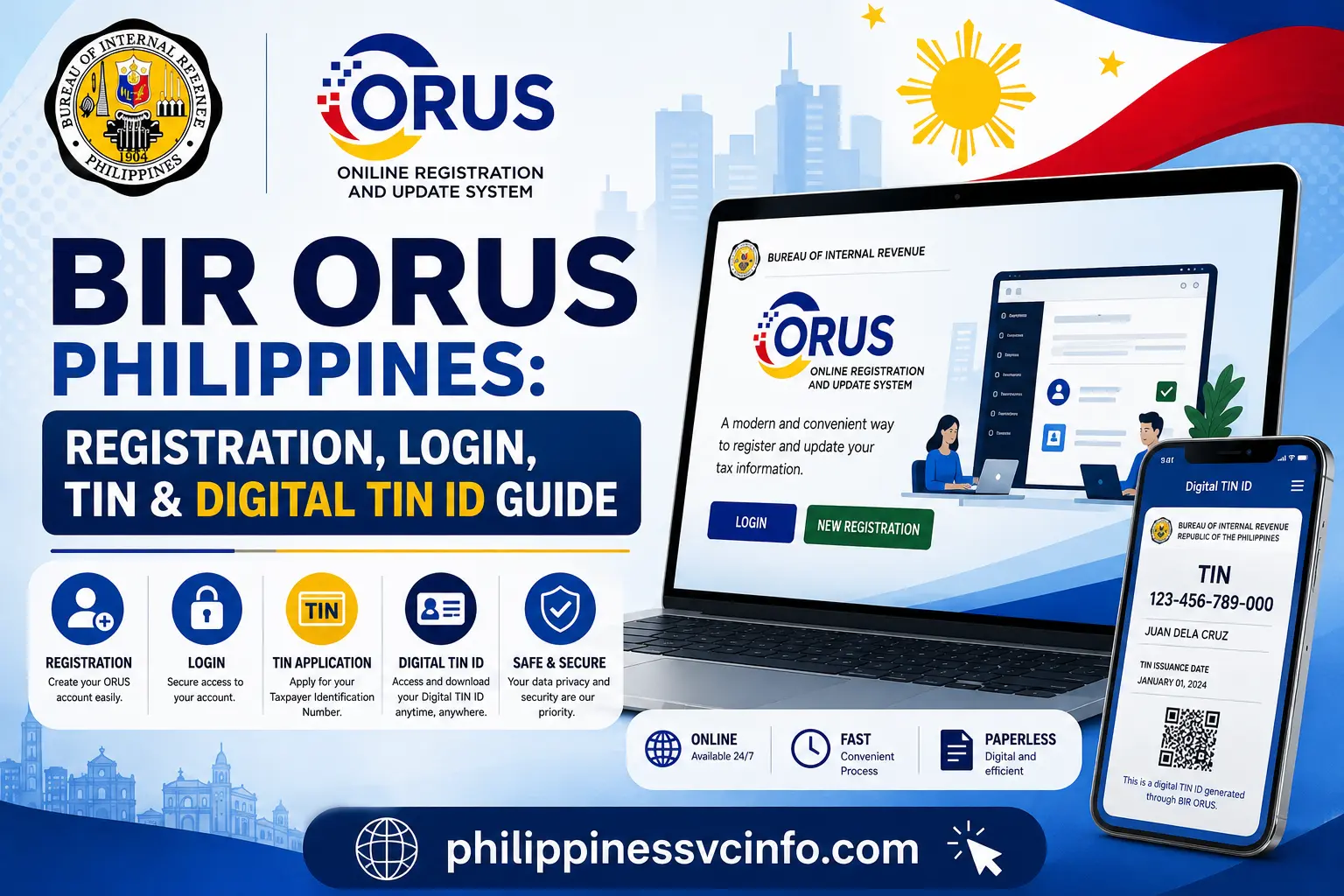
BIR ORUS, or the Online Registration and Update System, is the official digital platform of the Bureau of Internal Revenue (BIR) Philippines. It allows taxpayers to register, update taxpayer information, access registration-related services, manage compliance requirements, and obtain digital documents such as the Digital TIN ID through online processes.
What Is BIR ORUS?
BIR ORUS stands for Online Registration and Update System. It is an online BIR platform designed to move registration-related processes from purely manual transactions towards electronic processing.
The system can be particularly useful when a taxpayer needs to register, update information, obtain certain registration documents, or access digital registration credentials.
The official BIR website lists ORUS among its eServices and describes it as a system for the end-to-end process of taxpayer registration and updating registration information.
That makes ORUS different from other BIR online systems. For example, eFPS focuses on electronic filing and payment of tax returns, while eBIRForms provides an electronic method for preparing and filing certain tax returns.
What Can You Do Through ORUS?
Depending on the taxpayer type and transaction, ORUS can support services such as:
- New taxpayer registration
- Selected TIN issuance transactions
- Registration-information updates
- Digital TIN ID access
- Business registration-related transactions
- Registration of certain branches and facilities
- Books of Accounts registration
- TIN inquiry and other available registration services
- Selected payment-related registration transactions
BIR Revenue Memorandum Circular No. 121-2023 lists several ORUS functions, including primary registration, registration-address changes or transfers, TIN inquiry, Digital TIN ID access and other registration services.
Who Should Consider Using BIR ORUS?
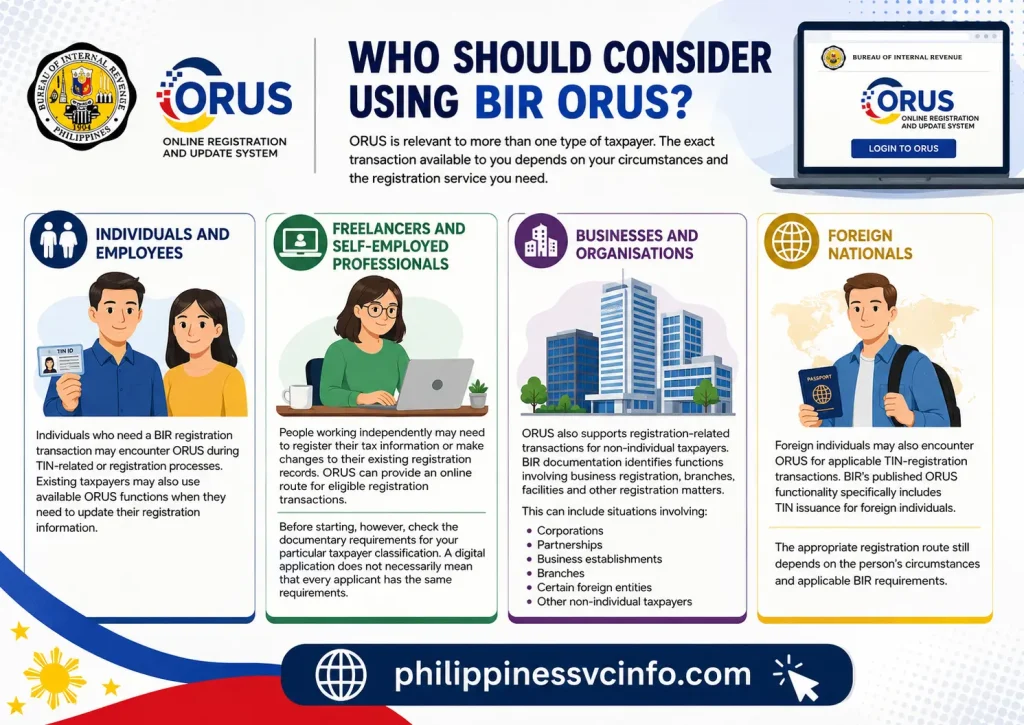
ORUS is relevant to more than one type of taxpayer. The exact transaction available to you depends on your circumstances and the registration service you need.
Individuals and Employees
Individuals who need a BIR registration transaction may encounter ORUS during TIN-related or registration processes. Existing taxpayers may also use available ORUS functions when they need to update their registration information.
Freelancers and Self-Employed Professionals
People working independently may need to register their tax information or make changes to their existing registration records. ORUS can provide an online route for eligible registration transactions.
Before starting, however, check the documentary requirements for your particular taxpayer classification. A digital application does not necessarily mean that every applicant has the same requirements.
Businesses and Organisations
ORUS also supports registration-related transactions for non-individual taxpayers. BIR documentation identifies functions involving business registration, branches, facilities and other registration matters.
This can include situations involving:
- Corporations
- Partnerships
- Business establishments
- Branches
- Certain foreign entities
- Other non-individual taxpayers
Foreign Nationals
Foreign individuals may also encounter ORUS for applicable TIN-registration transactions. BIR’s published ORUS functionality specifically includes TIN issuance for foreign individuals.
The appropriate registration route still depends on the person’s circumstances and applicable BIR requirements.
Where Is the Official BIR ORUS Website?
The safest starting point is the official BIR ORUS address:
You can also begin from the Bureau of Internal Revenue official website and locate ORUS under the BIR’s eServices.
The BIR website currently identifies ORUS as one of its official electronic services.
Avoid Unofficial TIN Services
Be careful with websites or individuals offering to obtain a TIN for a fee when you can use an official BIR process yourself.
The BIR website currently carries an advisory concerning offers of TIN services. For registration-related transactions, begin with the official BIR website or the official ORUS portal rather than an unfamiliar third-party site.
BIR ORUS Account Registration: What do you Need
Creating an ORUS account is the starting point for many online registration transactions.
The exact screen and available options can change depending on whether you are registering as an individual or non-individual taxpayer, and whether you already have a BIR record.
BIR’s published account-creation guidance states that taxpayers without an existing TIN or BIR record can use a permanent or company email, while taxpayers with an existing BIR record need to use the updated permanent email recorded in BIR registration.
Before You Create an Account
Have these basics ready:
- An active email address
- Your relevant taxpayer information
- Required identification documents
- Business documents, if applicable
- A stable internet connection
- A current web browser
For business or other registration transactions, the required documents depend on the particular application. Do not assume that the same documents apply to every ORUS service.
How to Create a BIR ORUS Account
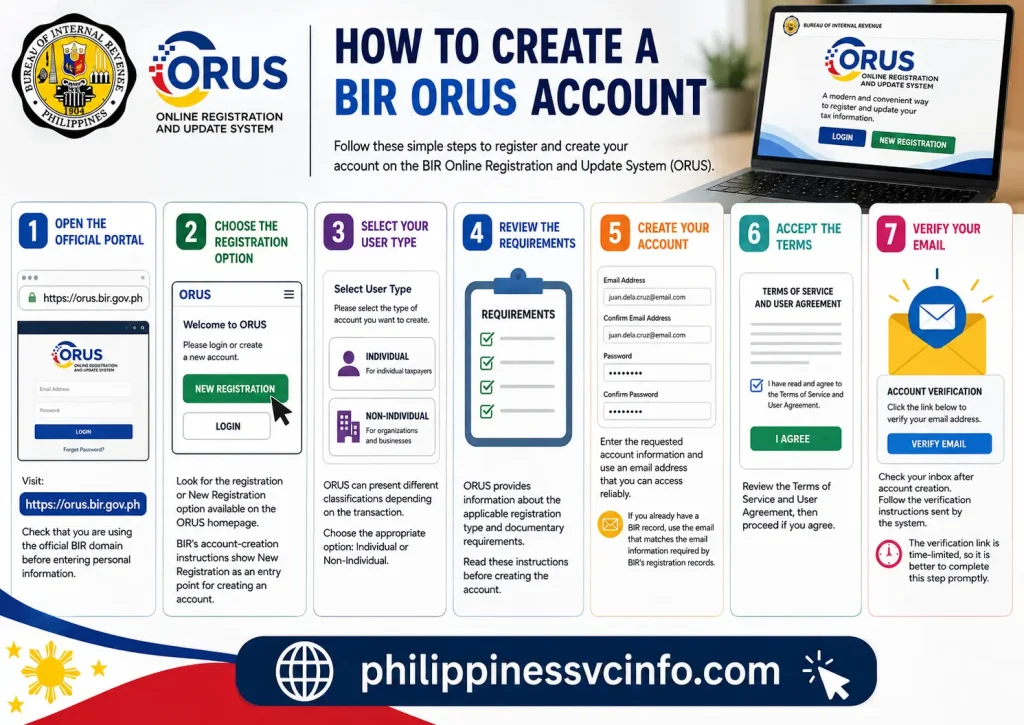
Step 1: Open the Official Portal
Visit:
Check that you are using the official BIR domain before entering personal information.
Step 2: Choose the Registration Option
Look for the registration or New Registration option available on the ORUS homepage.
BIR’s account-creation instructions show New Registration as an entry point for creating an account.
Step 3: Select Your User Type
ORUS can present different classifications depending on the transaction.
For example, BIR’s published instructions show choices such as:
- Individual
- Non-Individual
The appropriate option depends on whether you are registering as an individual taxpayer or an organisation/business.
Step 4: Review the Requirements
ORUS provides information about the applicable registration type and documentary requirements.
Read these instructions before creating the account. This is one of the easiest ways to avoid starting the wrong application.
Step 5: Create Your Account
Enter the requested account information and use an email address that you can access reliably.
If you already have a BIR record, make sure the email you use matches the email information required by BIR’s registration records. The BIR’s account-creation guidance specifically highlights this requirement for taxpayers with existing records.
Step 6: Accept the Terms
Review the Terms of Service and User Agreement, then proceed if you agree.
Step 7: Verify Your Email
Check your inbox after account creation. Follow the verification instructions sent by the system.
According to the supplied material, the verification link is time-limited, so it is better to complete this step promptly.
BIR ORUS Login Guide
Once your account has been created and verified, accessing the ORUS dashboard is straightforward.
Go to the official portal:
Then:
- Select Login.
- Choose the appropriate login classification if requested.
- Enter your registered email address.
- Enter your password.
- Complete any verification step presented by the system.
- Open the dashboard and select the service you need.
BIR’s published TIN-application instructions confirm that ORUS login uses the registered email address and password.
Forgot Your ORUS Password?
If you cannot remember your password, use the password-recovery option shown on the official login page rather than creating another account immediately.
Also check that you still have access to the email associated with your BIR registration.
ORUS Services You May Find Useful
One of the biggest advantages of BIR ORUS is that it brings several registration-related processes into one digital environment.
| ORUS Service | Typical Purpose |
|---|---|
| Taxpayer Registration | Register for applicable BIR registration services |
| TIN-Related Services | Handle eligible TIN issuance or inquiry transactions |
| Registration Updates | Modify eligible registration information |
| Digital TIN ID | Access or generate the digital identification document |
| Business Registration | Process eligible business registration transactions |
| Branch/Facility Registration | Handle applicable branch or facility registration |
| Books of Accounts | Register applicable books and accounting records |
| Registration Transfer | Process eligible transfer-of-registration requests |
BIR’s published ORUS materials support several of these functions, including primary registration, business registration, foreign-individual TIN issuance, TIN inquiry and Digital TIN ID access.
The BIR’s 2025 documentary-requirements checklist also lists online ORUS transactions such as securing a Digital TIN ID, updating contact information, changing residence address, transferring registration and adding an additional line of business.
Digital TIN ID Through ORUS
The Digital TIN ID is one of the most useful features associated with ORUS.
BIR Revenue Memorandum Circular No. 120-2023 announced the availability, use and acceptance of the TIN ID, while subsequent BIR guidance documents describe how taxpayers can view and download a Digital TIN ID through ORUS.
The ORUS-generated Digital TIN ID contains a QR code that can be used for online verification.
Why the Digital TIN ID Matters
Instead of relying only on a physical card, eligible taxpayers can access a digital version of their BIR identification document.
The BIR’s 2026 Revenue Memorandum Circular No. 34-2026 further states that both the Digital TIN ID generated through ORUS and the Digital TIN ID accessed through the DICT eGovPH Mobile App are recognised as valid government-issued identification, subject to the applicable authentication and verification procedures.
That distinction is important: how the Digital TIN ID was generated determines how it is authenticated.
For an ORUS-generated Digital TIN ID, BIR’s 2026 guidance identifies QR-code scanning as the online verification method.
What Prepare Before Starting an ORUS Transaction
A little preparation can prevent unnecessary delays.
Keep Your Personal Details Consistent
Check your:
- Full name
- Birth information
- Address
- Contact information
- Email address
- TIN, if you already have one
Use information that matches your BIR records and supporting documents.
Prepare Digital Copies of Documents
For transactions requiring attachments, keep clear electronic copies of the required documents in the formats accepted by the system.
Depending on the transaction, documents may include identification, business registration records, proof of address or other supporting documents.
Do not upload a document simply because it seems relevant. First check the BIR requirements for your specific transaction.
Use an Email You Can Keep Accessing
Your registered email can be important for account verification and other system communications.
For an existing BIR taxpayer, this is especially important because BIR’s ORUS account instructions state that the email used for account creation must correspond with the email recorded in its registration information.
A Useful BIR ORUS Checklist
Before clicking Submit, check:
- I am using the official ORUS website.
- My taxpayer classification is correct.
- My email address is active.
- My BIR information is accurate.
- I have the required documents.
- Uploaded files are clear and readable.
- I have reviewed the transaction details.
- I have saved relevant reference information after submission.
A few minutes of checking can save considerably more time if an application needs correction.
What Registration Information Can You Update Through BIR ORUS?
Not every change requires the same process, but BIR’s current checklist identifies several updates available through ORUS, including:
- Securing a Digital TIN ID
- Updating contact information
- Updating the contact person
- Updating civil status
- Changing residence address
- Transferring registration records
- Adding an additional line of business
These online registration updates are listed as free of charge in the BIR’s documentary-requirements checklist.
This is one of the practical reasons to keep your ORUS account accessible even after your original registration has been completed.
Example: Your Email or Contact Details Changed
Suppose your registered contact details are no longer current. Rather than assuming that you need to create another ORUS account, first check whether the particular update is supported through the existing taxpayer record.
The important principle is to update the existing registration information instead of creating duplicate taxpayer records.
How to Update BIR Information Through ORUS
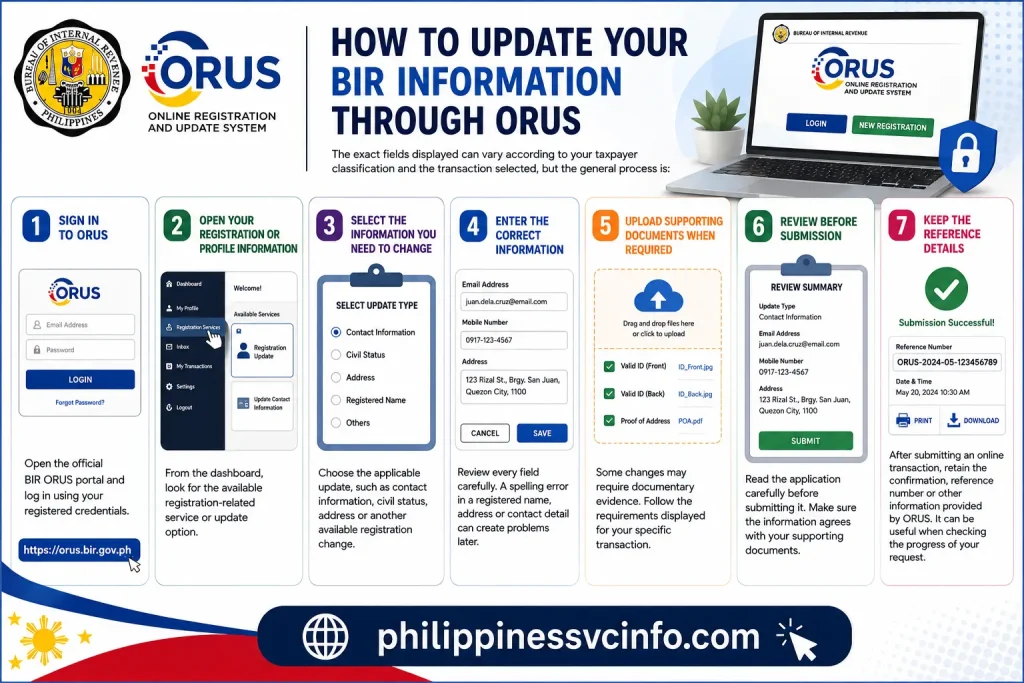
The exact fields displayed can vary according to your taxpayer classification and the transaction selected, but the general process is:
1. Sign in to ORUS
Open the official BIR ORUS portal and log in using your registered credentials.
2. Open Your Registration or Profile Information
From the dashboard, look for the available registration-related service or update option.
3. Select the Information You Need to Change
Choose the applicable update, such as contact information, civil status, address or another available registration change.
4. Enter the Correct Information
Review every field carefully. A spelling error in a registered name, address or contact detail can create problems later when you use the information for other BIR transactions.
5. Upload Supporting Documents When Required
Some changes may require documentary evidence. Follow the requirements displayed for your specific transaction rather than uploading unrelated files.
6. Review Before Submission
Read the application carefully before submitting it. Make sure the information agrees with your supporting documents.
7. Keep the Reference Details
After submitting an online transaction, retain the confirmation, reference number or other information provided by ORUS. It can be useful when checking the progress of your request.
Can You Get a Digital TIN ID Through ORUS?
Yes. The Digital TIN ID is one of the important services associated with ORUS.
BIR Revenue Memorandum Circular No. 120-2023 provides guidance on the availability, use and acceptance of the TIN ID, including the ORUS process for viewing and downloading the Digital TIN ID.
The Digital TIN ID generated through ORUS includes a QR code that can be used for online verification.
There is also an important 2026 development: BIR Revenue Memorandum Circular No. 34-2026 states that both the BIR Digital TIN ID generated through ORUS and the Digital TIN ID accessed through the DICT eGovPH Mobile App are recognised as valid government-issued identification, subject to the applicable authentication and verification procedures.
How to View Your Digital TIN ID in ORUS
Once you are eligible to access the Digital TIN ID, the ORUS interface provides a specific menu for it.
According to the BIR’s published taxpayer guide, the basic route is:
- Log in to your ORUS account.
- Open Get Your Digital TIN ID from the menu.
- Select View Your Digital TIN ID.
- Review the generated Digital TIN ID.
- Use Download Digital TIN ID if you need a downloadable or printable copy.
The BIR’s official instructions show that the displayed Digital TIN ID contains the taxpayer’s TIN, name and QR code.
Can You Update the Digital TIN ID?
If your registration information changes, the Digital TIN ID may also need to reflect the updated information.
The BIR’s ORUS guide states that the Update Digital TIN ID function can be used every 30 days from the last TIN ID generation.
So, if you have recently changed eligible registration information, don’t assume that an older downloaded copy will automatically update itself. Generate or update the digital version through the appropriate ORUS function.
How Is an ORUS Digital TIN ID Verified?
This is particularly important when someone asks whether a Digital TIN ID is genuine.
Under the 2026 BIR guidance, the verification method depends on where the Digital TIN ID was generated.
| Digital TIN ID source | Verification method |
|---|---|
| BIR ORUS | Online verification by scanning the QR code |
| DICT eGovPH App | Presentation and verification within the eGovPH App |
BIR RMC No. 34-2026 specifically distinguishes these two verification methods.
For an ORUS-generated Digital TIN ID, the QR code is therefore an important verification feature
BIR ORUS and Books of Accounts Registration
ORUS is not limited to personal registration details. It is also relevant to Books of Accounts registration.
The BIR’s official materials provide for online registration of books through ORUS. After successful registration, the system can generate a QR Stamp containing relevant taxpayer and book-registration information.
The QR Stamp can include information such as:
- TIN
- Registered name
- Registered address
- Type of book
- Books registered
- Permit or acknowledgement information where applicable
- Quantity
- Volume number
- Registration date
- Approval date
- QR code
For manual and permanently bound loose-leaf books, the QR Stamp is placed on the first page. For computerized books, the applicable QR Stamp is handled with the required records.
How to Register Books of Accounts Through ORUS
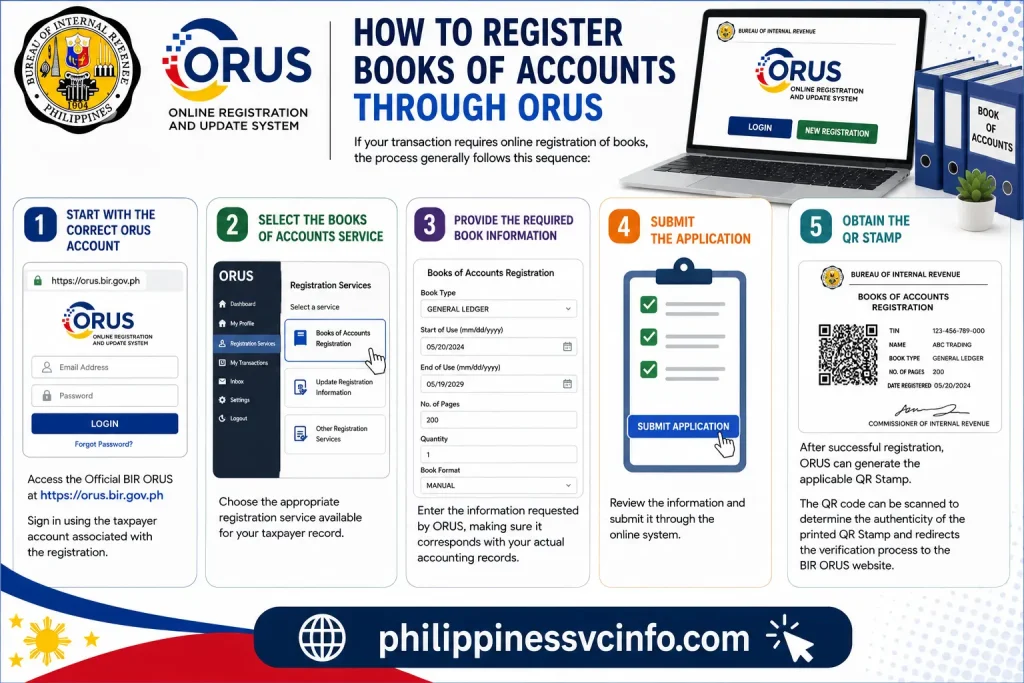
If your transaction requires online registration of books, the process generally follows this sequence:
Start With the Correct ORUS Account
Access:
Sign in using the taxpayer account associated with the registration.
Select the Books of Accounts Service
Choose the appropriate registration service available for your taxpayer record.
Provide the Required Book Information
Enter the information requested by ORUS, making sure it corresponds with your actual accounting records.
Submit the Application
Review the information and submit it through the online system.
Obtain the QR Stamp
After successful registration, ORUS can generate the applicable QR Stamp.
The BIR’s published guidance explains that the QR code can be scanned to determine the authenticity of the printed QR Stamp and redirects the verification process to the BIR ORUS website.
Why the ORUS Books-of-Accounts Process Matters
The online system can reduce the need for certain physical registration steps.
BIR guidance explains that, after successful online registration of applicable books, taxpayers do not need to go to the RDO for submission of the transmittal letter and USB flash drive in the specified computerized-books process, or for manual stamping in the applicable manual/loose-leaf process.
However, taxpayers should not assume that every situation is automatically handled online. BIR guidance identifies circumstances in which manual registration may still be allowed, including certain ORUS technical problems supported by proof, being physically at the RDO on the deadline, or qualifying as a senior citizen.
Important 2026 Reminder
The BIR’s current tax-reminder calendar shows registration deadlines for permanently bound loose-leaf books and other accounting records, as well as online registration through ORUS for computerized books
Deadlines can depend on the taxpayer’s fiscal year and the type of books involved, so check the current BIR calendar rather than relying on an old deadline from another website.
BIR ORUS for New Business Registration
ORUS can also be relevant when establishing a new business.
The BIR’s current Citizen’s Charter lists online ORUS services for both individual new business registrants and non-individual new business registrants, including the applicable TIN and registration process.
Depending on the taxpayer type, the registration process can involve information and documents relating to:
- The taxpayer or business
- Business address
- Nature of business
- Registration details
- Facilities or branches where applicable
- Authority-to-print requirements where applicable
- Other supporting documentation required by BIR
The important thing is to select the correct taxpayer classification before starting.
Individual vs Non-Individual
An individual business registrant and a corporation are not processed as though they were the same taxpayer.
If you are registering a sole proprietor or individual business, select the applicable individual route. If the applicant is a corporation, partnership or another organisation, use the relevant non-individual process.
The BIR Citizen’s Charter currently lists both categories as online ORUS services.
Can Foreign Individuals Use BIR ORUS?
ORUS also supports certain transactions involving foreign taxpayers.
BIR materials identify an online route for the TIN issuance of foreign individuals in applicable circumstances. The broader BIR service listings also include an online application for registration of nonresident foreign corporations.
A foreign applicant should not simply choose an ordinary individual registration option without checking the requirements that apply to their circumstances.
The correct process can depend on the reason for obtaining the TIN, residency or non-residency status, business activity and the applicable BIR rules.
ORUS Is Not the Same as eFPS
A common mistake is treating every BIR online platform as though it performs the same job.
They don’t.
| BIR platform | Main purpose |
|---|---|
| ORUS | Taxpayer registration and registration-information updates |
| eFPS | Electronic filing and payment of tax returns |
| eBIRForms | Electronic preparation and filing of applicable tax returns |
| ePay | Electronic payment channels for BIR tax dues and liabilities |
The BIR itself separates these services within its eServices section.
So, if you are searching for BIR ORUS login because you want to update registration information, ORUS is the relevant starting point. If your purpose is to file and pay a tax return, another BIR eService may be appropriate.
Common BIR ORUS Problems and Practical Fixes
ORUS Is Not Loading
First check your internet connection and try refreshing the official website.
If the problem appears to be on the BIR side, avoid repeatedly submitting the same transaction. A duplicate submission can create unnecessary confusion.
Email Verification Is Not Arriving
Check your spam, junk and promotional folders.
Also confirm that you entered the correct email address. If the email associated with an existing BIR record is incorrect, the issue may require correction through the applicable BIR process.
Your Existing BIR Information Does Not Match
Do not guess.
If the information displayed by ORUS differs from your documents, review the available registration-update process or seek guidance from the appropriate BIR office before submitting a transaction with inconsistent information.
You Cannot Get Your Digital TIN ID
Check whether your taxpayer record is eligible and whether the required information has been properly registered.
If you recently changed registration information, remember that the Digital TIN ID is a separate digital document that may need to be updated through its ORUS function.
What to Do If ORUS Shows an Error
When a technical error appears, take a screenshot before closing the page.
Record:
- The exact error message
- Date and time
- Transaction being attempted
- Reference number, if available
- Browser used
- Relevant application details
This information can be useful if you need to ask BIR for assistance.
For Books of Accounts registration, BIR guidance specifically recognises certain ORUS technical problems as a circumstance where manual registration may be allowed, provided there is proof of the technical issue.
Don’t fabricate an error screenshot or alter the displayed message. Keep the original evidence.
BIR ORUS Security Tips
Your ORUS account can contain sensitive taxpayer information, so treat the login credentials carefully.
Use the Official Website
Start with:
You can also reach ORUS through the official BIR website.
Don’t Share Your Password
BIR personnel or other people should not need your personal password simply to explain a registration procedure.
Be Careful With TIN Offers
The BIR currently displays an advisory concerning offers of TIN services. This is another reason to avoid unofficial websites promising to obtain a TIN for you.
Protect Your Digital TIN ID
Although the Digital TIN ID is designed for legitimate identification and verification, avoid casually posting an image of it on social media or sending it to unknown individuals.
A QR code can contain verification functionality, so treat the document as sensitive.
A Better Way to Handle Your ORUS Transaction
Before you begin, identify what you actually need to accomplish.
If you need a new registration, choose the appropriate registration service.
If you already have a TIN and need to change registration information, look for the relevant update service.
If you need a Digital TIN ID, use the dedicated Digital TIN ID function.
If you need to register Books of Accounts, use the applicable books-registration service and follow the current deadline.
This simple distinction can prevent you from choosing the wrong BIR online service.
BIR ORUS Troubleshooting Guide
Even when an online system is working normally, registration problems can occur because of incorrect information, outdated records, missing documents or technical issues.
ORUS Says Your Email Is Not Recognised
If you already have a BIR record, check whether the email you are using corresponds with the email registered with BIR.
This is particularly important for existing taxpayers. BIR’s published ORUS account guidance states that taxpayers with an existing BIR record should use the permanent email address updated in the BIR registration information.
If your BIR record contains an old email address, creating another account may not solve the problem. Instead, follow the applicable BIR process for updating your registration information.
Your Personal Details Are Incorrect
Never knowingly submit incorrect taxpayer information just to move past a registration screen.
Compare the details shown in ORUS with your official documents. If something is wrong, determine whether the relevant field can be corrected through an ORUS registration-update transaction.
The BIR’s documentary-requirements checklist includes several registration-information updates through ORUS, including contact information, civil status and address-related changes.
You Uploaded the Wrong Document
If the system allows you to revise the application before submission, correct the attachment before proceeding.
If the application has already been submitted, do not create multiple applications simply because you are uncertain about the first one. Check its status and use the appropriate BIR assistance channel when clarification is necessary.
What Should You Do After Submitting an ORUS Application?
Submitting an online application does not mean you should immediately forget about it.
Keep a record of:
- Your transaction type
- Application or reference number
- Submission date
- Confirmation message
- Uploaded documents
- Any email received from BIR or ORUS
- Final registration document or acknowledgement
A simple folder containing these records can be useful later, particularly for business registration or compliance-related transactions.
Check Your Email Regularly
ORUS-related communications may be sent to the email associated with your account or registration.
If you are waiting for an application result, check your normal inbox as well as spam or junk folders.
BIR ORUS vs Visiting an RDO
One of the main advantages of ORUS is the ability to perform eligible registration transactions online instead of automatically travelling to a Revenue District Office (RDO).
That does not mean every BIR transaction has been completely removed from physical offices.
Some transactions may still require an RDO, additional verification or another BIR process depending on the circumstances.
Think of ORUS as the digital route for eligible registration services, not as a replacement for every BIR function.
When Might You Still Need BIR Assistance?
Consider contacting or visiting the appropriate BIR office when:
- Your taxpayer information appears inconsistent with official records.
- The transaction you need is unavailable in ORUS.
- You have a registration issue that cannot be corrected online.
- A technical problem prevents completion and the applicable rules require supporting evidence.
- You are uncertain about your taxpayer classification.
- Your documents do not match the information in the BIR system.
- You need clarification about a transaction-specific documentary requirement.
The BIR’s official website should be your starting point for current contact information, announcements and service guidance.
BIR ORUS Best Practices for Taxpayers
A few habits can make future transactions much easier.
Keep Your Registration Information Current
Do not wait until you urgently need a BIR document before checking your registration details.
If your address, contact information or another registration detail changes, determine whether the change should be reported and whether ORUS provides the applicable update service.
Keep Copies of Important BIR Documents
Save electronic copies of documents such as:
- Digital TIN ID
- Certificate of Registration
- Registration confirmations
- Books of Accounts registration information
- Application references
- Relevant BIR correspondence
Use a secure location rather than keeping everything only in an email inbox.
Check BIR Announcements
Online systems and procedures can change. A guide published several years ago may not reflect the latest ORUS interface, documentary requirements or deadlines.
For important transactions, confirm the current instructions on the official BIR website before submitting.
Common BIR ORUS Mistakes to Avoid
1. Using an Unofficial Website
The official ORUS address is:
Be particularly cautious with websites that ask for unnecessary personal information or offer to obtain a TIN for a fee.
2. Creating Duplicate Accounts
If you already have a BIR record, first determine whether your existing information can be used or updated.
Creating multiple accounts without understanding the underlying problem can make the situation more complicated.
3. Entering Information That Does Not Match Your Documents
Your application should be consistent with the official information and documents supporting the transaction.
Check names, dates, addresses, TIN information and other important fields before submission.
4. Ignoring Transaction-Specific Requirements
A new individual taxpayer, an existing taxpayer changing address and a corporation registering a business do not necessarily have identical requirements.
Always read the instructions attached to the particular ORUS service you selected.
5. Forgetting About Deadlines
Some BIR compliance activities have specific deadlines. Books of Accounts registration is one example where timing matters.
Don’t rely solely on an old blog post or social-media post for a current deadline. Check BIR’s latest official reminders.
Frequently Asked Questions About BIR ORUS
BIR ORUS Quick Reference
| What you need | Where to start |
|---|---|
| New taxpayer registration | BIR ORUS |
| Eligible TIN application | BIR ORUS |
| Registration information update | BIR ORUS |
| Digital TIN ID | BIR ORUS |
| Books of Accounts registration | BIR ORUS, where applicable |
| Tax return filing/payment | Appropriate BIR eService |
| General BIR information | Official BIR website |
For current services and requirements, always check the official BIR sources because online procedures can be revised.
BIR ORUS: A Practical Final Checklist
Before starting:
- Confirm that you are on orus.bir.gov.ph.
- Identify exactly which BIR transaction you need.
- Check whether you already have a TIN.
- Make sure your registered email information is appropriate.
- Prepare the documents required for your specific transaction.
- Use accurate information.
- Keep electronic copies of submitted documents.
- Save your reference number or confirmation.
- Monitor your email after submission.
- Check current BIR announcements for deadlines and procedural changes.
After completion, don’t stop at the confirmation screen. Download or save the relevant registration documents and keep your records organised.
Final Takeaway
BIR ORUS has become an important digital gateway for taxpayer registration and registration-related transactions in the Philippines. Instead of treating it simply as a website for obtaining a TIN, taxpayers can use the platform for a broader range of eligible services, including registration updates, Digital TIN ID access, business-related registration and Books of Accounts registration.
The best approach is to start with the official BIR ORUS portal, identify the exact service you need and follow the requirements shown for your taxpayer classification. Existing taxpayers should pay particular attention to the information already recorded in their BIR profile, especially their registered email and other identifying details.
For official information, use the BIR website:
Keeping your taxpayer information accurate, protecting your login credentials and checking current BIR guidance before important submissions can make the ORUS experience considerably smoother.
Discover What You Need to Know:
- Philippine Statistics Authority (PSA) 2026: Online Services, Certificates, Fees & National ID Guide
- eGov PH and BancNet Online Philippines 2026: Registration, Login, Services & Payment Guide
- POEA e-Registration Philippines 2026: DMW Login, Registration, Requirements & OFW Guide
- PNPA Admission Philippines 2026: Requirements, Application & PNPACAT Guide
- CIRAS Philippines 2026 : Login, Registration, Official Website & User Guide