

SIAS CSPC is the Student Information and Accounting System used by Camarines Sur Polytechnic Colleges (CSPC) to support student-related services. It provides an online platform for managing registration, enrollment, academic information, student records, and related transactions, helping students and authorized personnel access essential academic and administrative services efficiently.
What Is SIAS CSPC?
SIAS CSPC stands for the Student Information and Accounting System of Camarines Sur Polytechnic Colleges. It is intended to bring different student-related processes into a digital environment instead of requiring every academic transaction to be handled manually.
For students, the system can be particularly useful around enrolment periods. CSPC’s published Citizen’s Charter states that the College Registrar adopts SIAS for the effective and efficient processing of enrolment.
Depending on the student’s account, academic status, and the services currently enabled by CSPC, the wider portal ecosystem may be used for activities such as:
- Online enrolment
- Student account access
- Subject and class information
- Academic records
- Grades
- Class schedules
- Student evaluation information
- Accounting or assessment information
- Admission-related activities
- Student records and requests
The exact options visible after login can vary according to the user’s role and current CSPC processes.
Quick Facts About SIAS CSPC
| Item | Information |
|---|---|
| Institution | Camarines Sur Polytechnic Colleges |
| Common system name | Student Information and Accounting System (SIAS) |
| Main website | cspc.edu.ph |
| Student portal | my.cspc.edu.ph |
| SIAS/admission link | icloudph.com/cspc/sias/ |
| Records office | Student Registration and Records Office |
| Location | San Miguel, Nabua, Camarines Sur 4434 |
| Official email | [email protected] |
| Telephone | (054) 288-4421 to 23 |
CSPC’s official website currently lists the Student Information and Accounting System as one of its institutional services and provides contact information for the College.
Official CSPC Websites and Portals
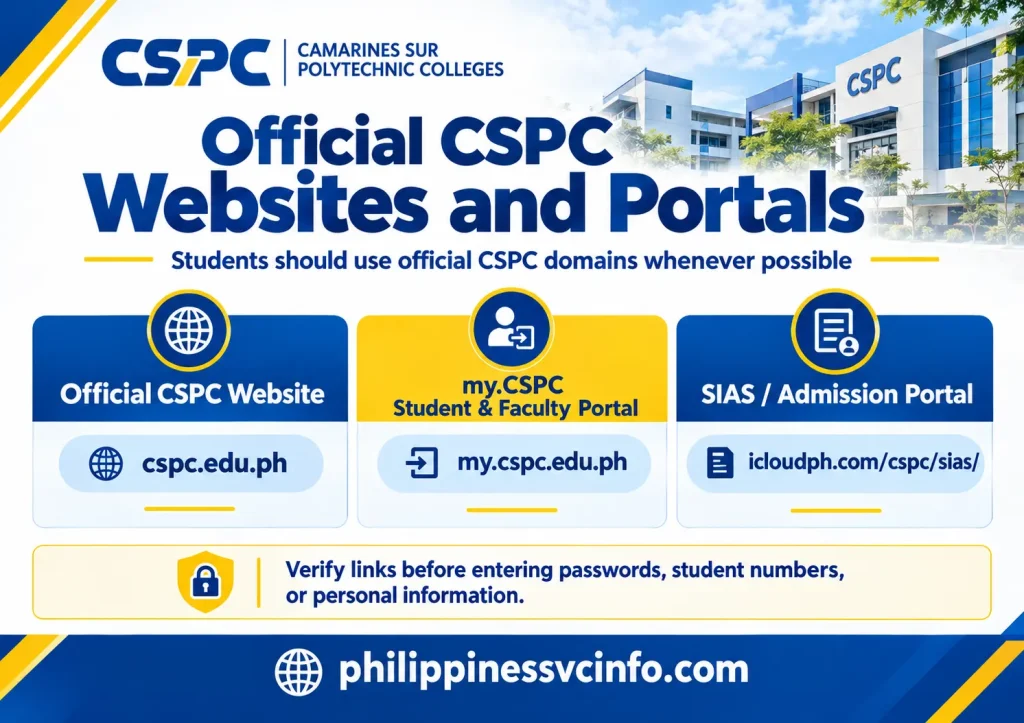
Students should use official CSPC domains whenever possible, particularly when entering student numbers, passwords, personal information, or other academic details.
1. Official CSPC Website
The primary institutional website is:
The website provides access to institutional information, admission resources, academic information, announcements, offices, and links to online services.
2. my.CSPC Student and Faculty Portal
The current official my.CSPC portal is:
The official portal currently identifies itself as the Student and Faculty Portal and includes access points for my.CSPC and CSPC-LeOnS, as well as CSPC-CAT application resources.
3. SIAS / Admission Portal
The supplied CSPC information identifies the following SIAS/admission address:
Because online systems can change, students should verify links through CSPC’s official website or current institutional instructions before submitting sensitive information.
How to Log In to the CSPC Student Portal
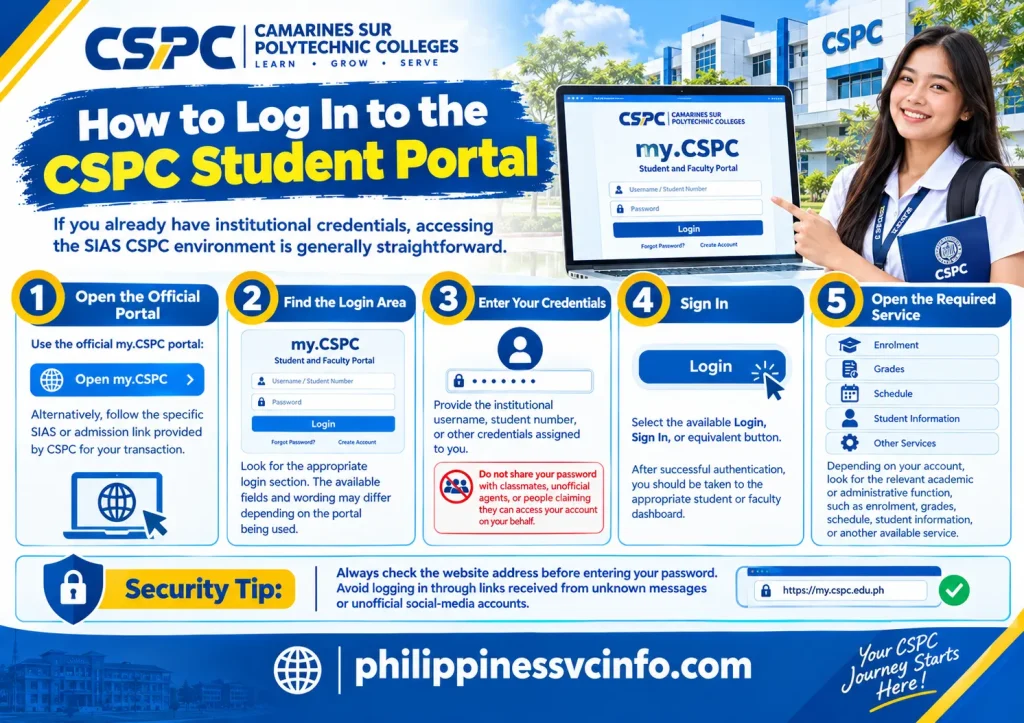
If you already have institutional credentials, accessing the SIAS CSPC environment is generally straightforward.
Step 1: Open the official portal
Use the official my.CSPC portal:
Alternatively, follow the specific SIAS or admission link provided by CSPC for your transaction.
Step 2: Find the login area
Look for the appropriate login section. The available fields and wording may differ depending on the portal being used.
Step 3: Enter your credentials
Provide the institutional username, student number, or other credentials assigned to you.
Do not share your password with classmates, unofficial agents, or people claiming they can access your account on your behalf.
Step 4: Sign in
Select the available Login, Sign In, or equivalent button.
After successful authentication, you should be taken to the appropriate student or faculty dashboard.
Step 5: Open the required service
Depending on your account, look for the relevant academic or administrative function, such as enrolment, grades, schedule, student information, or another available service.
Security tip: Always check the website address before entering your password. Avoid logging in through links received from unknown messages or unofficial social-media accounts.
SIAS CSPC for New & Incoming Students
Prospective students may encounter different CSPC systems before they become active students.
The CSPC portal ecosystem currently includes resources for CSPC-CAT undergraduate and graduate applications, while the Student Information Sheet system is used for student enrolment information.
If you are applying for admission, follow the instructions given by CSPC for your applicant category rather than assuming that an existing student login will work.
Admission process in practical terms
A prospective student may need to:
- Open the official CSPC admission or application resource.
- Complete the required application information.
- Keep the assigned application or control details.
- Check the status or instructions provided by CSPC.
- Follow the College’s directions after admission or qualification.
- Complete student information and enrolment requirements when instructed.
The official Student Information Sheet currently contains sections for classification, personal information, family information, educational background, and final review/submission.
Completing the CSPC Student Information Sheet
The CSPC Student Information Sheet provides a useful example of the information students may be asked to submit during enrolment.
The official form includes:
- Student number
- Course
- Personal details
- Contact information
- Citizenship and nationality
- Date and place of birth
- Permanent and residential address
- Family information
- Guardian information where applicable
- Educational background
- Senior high school information
- Previous college information for applicable students
- Graduate school information for applicable students
The form instructs students to review their information before submitting it and includes a data privacy statement concerning the collection and processing of information for legitimate student-record purposes.
Important information before submission
CSPC’s online Student Information Sheet gives several reminders, including making sure required information is completed, ensuring the name and birth date match PSA/NSO records, using N/A where appropriate, and checking the details before submission.
It also advises users to open the form directly through a web browser rather than opening the link through Messenger. If an expected email does not arrive, students are advised to check their spam folder and use the available email-delivery option on the form.
What Can Students Use SIAS CSPC For?
The most important reason students look for SIAS CSPC login information is usually to complete or check an academic transaction.
Enrolment and subject registration
CSPC’s published enrolment procedure shows that SIAS is used in online enrolment. The documented process includes checking the student’s SIAS status, verifying grades and prerequisites, accessing class schedules, selecting subjects, and submitting the enrolment selection.
Before enrolling, students should make sure that:
- Previous academic requirements have been cleared.
- Required grades are available.
- Prerequisites have been satisfied.
- Any applicable clearance requirements are complete.
- They understand any department or dean instructions.
- Their student account is ready for online enrolment.
CSPC’s Student Handbook also notes that enrolment rules can include registration deadlines and conditions relating to late enrolment, subject changes, and academic loads.
Checking class schedules
The published SIAS enrolment procedure indicates that students can use their student ID and account password to access class schedules before selecting subjects for enrolment.
If a schedule does not appear, do not immediately assume that the system is broken. First check whether your enrolment has been properly processed and whether there are outstanding academic or administrative requirements.
Checking Grades and Academic Records

Academic information is another reason students may access the CSPC SIAS portal.
CSPC’s Student Registration and Records Office is responsible for several academic-record functions, including maintaining student evaluation checklists and grading sheets, handling requests related to changes or corrections of grades, and providing assistance with academic deficiencies and appeals.
If a grade appears to be missing or incorrect, students should contact the appropriate academic or records office instead of repeatedly refreshing the portal.
For an academic-record concern, prepare useful details such as:
- Student number
- Course/programme
- Subject
- Semester or academic period
- Screenshot of the issue, if appropriate
- Relevant enrolment information
This can help the responsible office understand the problem more quickly.
Student Records and Document Requests
The Student Registration and Records Office provides several services connected with official academic records.
According to CSPC’s official page, these include processing and issuance of Official Transcripts of Records, diplomas, validation of student IDs, certificates of eligibility to transfer or honourable dismissal, academic-record corrections, verification of student records, and other academic-record services.
This distinction is important: seeing information inside SIAS CSPC does not necessarily mean that a digital screen is the same as an officially issued academic document.
If you need a document for employment, board examination, admission, transfer, or another formal purpose, check the current requirements of the responsible CSPC office.
Accounting and Student Financial Information
The name Student Information and Accounting System reflects the system’s relationship with both student information and accounting processes.
Students may encounter account-related information connected with enrolment, assessment, clearance, or other financial requirements. However, the exact information available can depend on the current CSPC system configuration and the student’s account.
If your enrolment cannot proceed because of an accounting or clearance issue, confirm the status with the appropriate CSPC office rather than repeatedly attempting the same online transaction.
Keep payment receipts and transaction references when applicable. They can be useful if a payment has been completed but has not yet appeared in the relevant account.
Why Is My Grade or Schedule Not Showing?
A missing grade or schedule does not always mean that your account is defective.
Possible reasons include:
- The academic record has not yet been posted.
- Enrolment validation is incomplete.
- A prerequisite or academic requirement needs attention.
- The student account has an outstanding administrative issue.
- The portal is temporarily unavailable.
- The information belongs to a different academic period.
Start by checking your account again after confirming that your enrolment process has been completed. If the issue remains, contact the appropriate CSPC office.
CSPC’s Student Registration and Records Office specifically handles academic-record management and student/faculty inquiries.
SIAS CSPC Login Problems and Troubleshooting

Online portals occasionally experience access problems, particularly when many students are attempting to use the system around an enrolment deadline.
Forgot your password?
Use the password-recovery facility available on the relevant portal if one is provided.
If you cannot recover the account yourself, contact the appropriate CSPC support office and provide enough information for them to identify the issue.
Never send your password in an email or social-media message.
The SIAS page will not load
Try these basic checks:
- Refresh the page.
- Open the portal in Google Chrome, Mozilla Firefox, or Microsoft Edge.
- Clear browser cache and cookies if the problem persists.
- Try another internet connection.
- Temporarily disable browser extensions that may interfere with the page.
- Try again later if the service appears to be experiencing heavy traffic.
The CSPC Student Information Sheet itself recommends using a modern web browser and opening its link directly rather than through Messenger.
Login works but information is missing
Check whether the problem affects one service or the entire account.
For example, if you can log in but cannot see a particular grade, schedule, or enrolment option, the issue may require academic or records assistance rather than a password reset.
CSPC Student Registration and Records Office
The Student Registration and Records Office (SRR/SRRO) is an important contact point for academic records and registration concerns.
Its official CSPC page lists responsibilities including student evaluation records, grading-sheet management, enrolment-related assistance, academic-record corrections, student-record verification, and responses to student and faculty inquiries.
Students should use the responsible office based on the type of problem rather than sending the same request to several departments.
For example:
| Problem | Appropriate starting point |
|---|---|
| Academic record concern | Student Registration and Records Office |
| Grade correction concern | Student Registration and Records Office / relevant academic authority |
| Student record verification | Student Registration and Records Office |
| Enrolment concern | Registration/Records and relevant academic office |
| Portal access problem | Relevant CSPC ICT/support channel |
| Payment or assessment concern | Appropriate accounting office |
| Admission concern | CSPC admission process/contact |
Official CSPC Contact Information
CSPC’s official contact page lists the following general institutional details:
Camarines Sur Polytechnic Colleges
San Miguel, Nabua, Camarines Sur 4434, Philippines
Telephone: (054) 288-44-21 to 23
Email: [email protected]
The same contact information is also displayed on CSPC’s Student Registration and Records page.
For account-specific problems, use official CSPC contact channels rather than unofficial Facebook pages, third-party websites, or individuals offering paid account access.
Common SIAS CSPC Questions
SIAS CSPC Checklist for Students
Before starting an online academic transaction, keep this checklist nearby:
- Confirm that you are using an official CSPC website.
- Keep your student number or assigned credentials available.
- Check your academic and enrolment status.
- Review prerequisites before selecting subjects.
- Check schedules carefully.
- Verify your personal information.
- Keep payment or transaction records where applicable.
- Save important confirmation details.
- Do not share your password.
- Contact the responsible CSPC office when an issue cannot be resolved online.
A few minutes of checking can prevent avoidable problems, particularly during busy registration periods.
Final Takeaway
SIAS CSPC is an important part of Camarines Sur Polytechnic Colleges’ digital student-service environment. It connects student information and accounting functions with processes such as enrolment and academic administration, while my.CSPC provides a central student and faculty portal. CSPC’s official resources also provide dedicated services for student information, academic records, admission, and institutional support.
For the safest experience, begin with the official CSPC website and my.CSPC portal, carefully verify your student information, and follow the current instructions provided by the College. When a problem involves grades, records, enrolment validation, or another account-specific issue, contacting the responsible CSPC office is more reliable than relying on unofficial instructions.
Discover What You Need to Know:
- PUP SIS Philippines 2026 : Student Portal Login, Grades, Enrollment & Guide
- ATPECOOP Portal Guide Philippines 2026 : Login, Membership, Loans & Services
- Nutrition Month Headdress Printable Philippines 2026 : Easy DIY Templates, Ideas & NNC Guide
- ClassPoint Philippines 2026 : Login, AI Quiz, Student Join & PowerPoint Guide








