

The SALN Form 2026 is an official Philippine government declaration used by covered public officials and employees to disclose their assets, liabilities, net worth, business interests, financial connections, and required family information. It is filed under the Civil Service Commission’s updated 2026 Omnibus Rules on the SALN.
Download the Current CSC Form Under the Omnibus Rules
The Statement of Assets, Liabilities, and Net Worth (SALN) is one of the key disclosure requirements for covered Philippine government officials and employees. It records a declarant’s assets, liabilities, net worth, business interests and financial connections, together with the relevant disclosures concerning a spouse and certain children.
For the current rules, the Civil Service Commission (CSC) uses the 2026 SALN Form issued under CSC Resolution No. 2500632, the Omnibus Rules on the SALN. The resolution was promulgated on 25 June 2026, and the CSC has since published updated form files, including versions identified as updated on 3 February 2026.
That distinction matters if you’re searching for a SALN Form 2026 download. Older SALN templates can still appear in search results, but the CSC’s current download page is the safer starting point.
At a glance
| Question | Current rule |
|---|---|
| What form is prescribed? | 2026 SALN Form |
| Main form | Annex A |
| Additional sheet for declarant | Annex B – AS-1 |
| Additional sheet for spouse/children | Annex C – AS-2 |
| Annual deadline | On or before 30 April |
| Annual statement date | 31 December of the preceding year |
| Assumption of office | Within 30 days |
| Separation from service | Within 30 days |
| Signature | Declarant signs or initials all pages |
| Copies | Three original copies, subject to applicable filing procedures |
The CSC’s official guidance confirms the three filing situations: assumption of office, annual filing, and exit from government service. It also states that the spouse’s signature is no longer required under the updated rules.
Where to Download the 2026 SALN Form
The most reliable way to get the SALN Form 2026 is through the CSC’s official website rather than an unofficial document-sharing site.
The CSC download section currently lists the following materials under CSC Resolution No. 2500632 – Omnibus Rules on the SALN:
- Annex A – 2026SALN Form
- Annex B – 2026SALN Form AS-1 for the declarant
- Annex C – 2026SALN Form AS-2 for spouse and children
- Annex D – Repository Agencies
- Annex E – 2026SALN Request Form
- SALN Guidelines and the Omnibus Rules themselves.
The CSC’s general forms page also lists the Statement of Assets, Liabilities, and Net Worth (SALN) Form under Personnel Records.
Important: Before filling out a downloaded copy, check that you are working with the prescribed/current version. The CSC’s download page identifies the Annex A, B and C files as updated on 3 February 2026.
Who Needs to File a SALN?
The general rule comes from Republic Act No. 6713, the Code of Conduct and Ethical Standards for Public Officials and Employees. The law requires covered public officials and employees to make a sworn declaration of their assets, liabilities, net worth and relevant financial or business interests.
The CSC’s 2026 filing reminder states that the SALN requirement applies to public officials and employees in:
- National government agencies
- Local government
- State universities and colleges
- Government-owned or controlled corporations, including those with or without original charters
However, there are exclusions. The CSC specifically says the requirement does not cover people serving in an honorary capacity, labourers, and casual or temporary workers.
This is an important correction to a common summary of the rules: not every person working in or around government automatically falls within the SALN filing requirement. If your employment category is unusual, confirm your status with your agency’s HR office or the applicable CSC rules rather than relying on a generic checklist.
When Is the SALN Due?
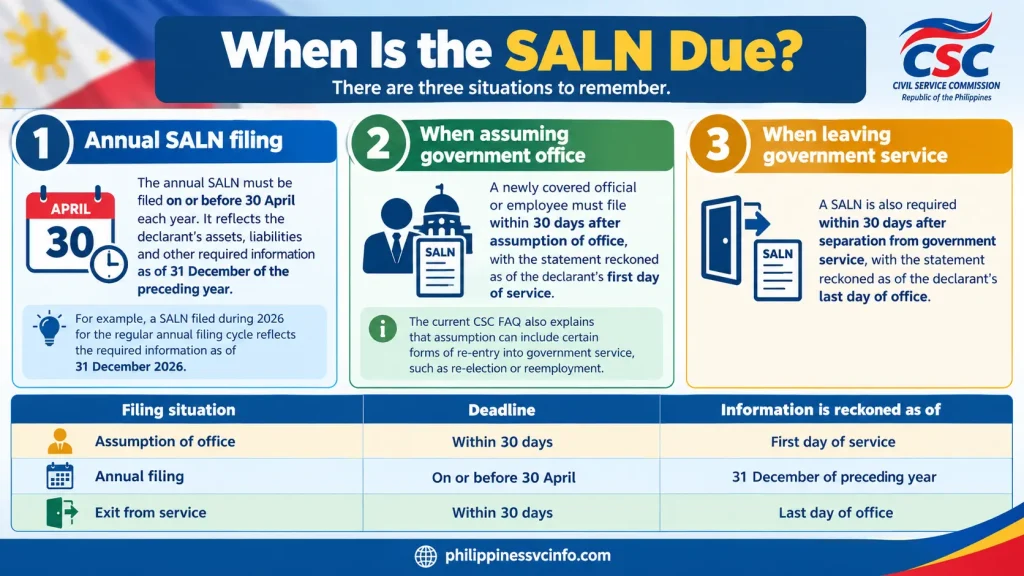
There are three situations to remember.
1. Annual SALN filing
The annual SALN must be filed on or before 30 April each year. It reflects the declarant’s assets, liabilities and other required information as of 31 December of the preceding year.
For example, a SALN filed during 2026 for the regular annual filing cycle reflects the required information as of 31 December 2026.
2. When assuming government office
A newly covered official or employee must file within 30 days after assumption of office, with the statement reckoned as of the declarant’s first day of service. The current CSC FAQ also explains that assumption can include certain forms of re-entry into government service, such as re-election or reemployment.
3. When leaving government service
A SALN is also required within 30 days after separation from government service, with the statement reckoned as of the declarant’s last day of office.
| Filing situation | Deadline | Information is reckoned as of |
|---|---|---|
| Assumption of office | Within 30 days | First day of service |
| Annual filing | On or before 30 April | 31 December of preceding year |
| Exit from service | Within 30 days | Last day of office |
The CSC has also clarified that someone who assumes office during the current year does not need to file the annual SALN by 30 April of that same year merely because they have newly entered government service.
What Information Goes Into a 2026 SALN?
The form is more than a list of bank accounts or property. It is intended to provide a detailed financial disclosure.
The official 2026form begins with the declarant’s basic information and asks the filer to identify whether the document concerns assumption of office, annual filing or exit from government service. It also accommodates information concerning a spouse, joint or separate filing, multiple marriages where legally applicable, and unmarried children below 18 years of age living in the declarant’s household.
The financial portion covers several broad categories.
Real properties
The 2026form provides fields for information such as:
- Description of the property
- Kind of property
- Exact location
- Assessed value
- Current fair market value
- Acquisition year
- Mode of acquisition
- Acquisition cost
The form specifically refers to the current fair market value as found in the Tax Declaration of Real Property, if available.
Personal properties
Personal property is disclosed with the:
- Description
- Acquisition year
- Acquisition cost or amount
The wider SALN framework also covers other assets such as investments, cash, stocks, bonds and similar assets.
Liabilities
Liabilities must also be disclosed. This is essential because the SALN’s net worth is calculated by subtracting total liabilities from total assets.
In practical terms:
Net Worth = Total Assets − Total Liabilities
A simple example is useful. If a declarant has total assets of ₱5,000,000 and total liabilities of ₱1,500,000, the resulting net worth is ₱3,500,000.
The calculation should be checked carefully before the form is signed.
What About a Spouse and Children?
The SALN rules include relevant disclosures involving the declarant’s family.
The 2026form specifically provides space for the spouse and for unmarried children below 18 years of age living in the declarant’s household.
Where both spouses are public officials or employees, the form permits joint or separate filing.
One of the notable changes under the new rules is that the spouse’s signature is no longer required, although joint filing has its own signature requirements. The CSC identifies removal of the spouse-signature requirement as one of the changes introduced by the Omnibus Rules.
The new form also recognises multiple marriages in the situations covered by the rules and provides a place to identify the relevant spouse or spouses.
Start With the Filing Type and Personal Details
Before entering any financial figures, identify the reason for filing. The 2026SALN Form provides three main choices: assumption of office, annual filing, and exit from government service. The date used for the financial disclosures depends on which category applies.
For an annual SALN, the financial position is stated as of 31 December of the preceding year. For an assumption SALN, use the first day of service, while an exit SALN is based on the last day of office.
Enter your name, position and agency carefully. For uniformed personnel, the CSC rules explain that the position refers to the rank shown in the appointment paper. The form does not require unnecessary identifying details such as a title number, vehicle plate number, engine number or bank account number when describing property.
Spouse and children
If the spouse is not a government employee, the declarant generally provides the spouse’s name but does not have to provide the spouse’s job title, office and office address.
The SALN also covers unmarried children below 18 years old who live in the declarant’s household. The CSC rules clarify that a child may still be considered part of the household even when physically elsewhere if the child remains dependent on the declarant for support.
If both spouses are government employees, they may generally choose joint or separate filing. That choice should be reflected in their respective SALNs.
How to Declare Real Property
Real estate is one of the sections where careful preparation pays off. The 2026 Omnibus Rules require real property to be described with enough information to identify what it is and where it is located.

The form asks for details including:
- Description of the property
- Kind or classification
- Exact location
- Year acquired
- Mode of acquisition
- Assessed value
- Fair market value
- Acquisition cost or applicable expenses
The kind of property is based on its use, such as residential, commercial, agricultural, industrial or mixed-use. A description can identify something such as land only, land with a building, house and lot, condominium unit, parking lot or an improvement.
What if you cannot find the Tax Declaration?
The latest available tax declaration is important when determining assessed and fair market values. However, the CSC rules provide alternatives when the tax declaration is not readily available.
A declarant may use information from another government source, including the appropriate Local Assessor’s Office. If a property has no tax declaration at all, such as certain memorial lots or columbarium units, the rules allow “N/A” or “Not Applicable” to be indicated for the assessed and fair market value fields.
If the latest tax declaration does not show a market value, the rules also identify government sources such as the Assessor’s Office or the applicable Bureau of Internal Revenue (BIR) zonal value as possible sources for the market value.
Property that has been purchased but is not yet registered
Registration is not the only factor that determines whether a property belongs in the SALN.
A property covered by a deed of sale, donation or an extra-judicial settlement of estate may still have to be disclosed even if registration has not yet been completed. Inherited real property must likewise be declared even when it has not yet been registered in the heir’s name. If there are several heirs, the declarant reports the applicable proportionate share.
There is an important distinction for property that has already been conveyed. Real property already transferred to another person through a deed of absolute sale or perfected donation is not declared merely because the new owner has not yet completed registration.
Improvements are separate
If you built an extension, garage or other improvement on land, do not automatically combine everything into one entry. The CSC rules say an improvement should be declared separately from the land to which it is attached.
Its acquisition cost refers to the expenses incurred for the improvement, including labour and materials, or the amount shown in the latest available tax declaration where applicable.
Personal Property: What Should Be Included?
Personal property covers much more than cars.
Under the 2026 rules, it includes valuable movable property such as:
- Motor vehicles
- Jewellery
- Appliances
- Furniture
- Other tangible personal property
- Cash on hand
- Cash in banks
- Stocks
- Bonds
- Securities
- Negotiable instruments
- Certain investments and funds
The rules specifically recognise investments such as memorial plans, pre-need plans, provident funds and insurance contracts with attached investments.
For ordinary personal property, provide the mode, year and acquisition cost. For money, report the applicable amount or value.
Can similar items be grouped?
Yes, in certain circumstances.
Personal properties collectively acquired or items of the same nature and kind may be declared generally or collectively. The rules permit “various years” and “various modes” where appropriate.
Registered personal property is treated differently. Items such as motor vehicles, boats, aircraft and firearms must be declared individually.
Foreign currency
If an asset such as cash, a bank balance or securities is denominated in foreign currency, it must be converted into its Philippine-peso equivalent using the applicable exchange rate for the relevant SALN date.
For an annual filing, that means the rate applicable as of 31 December of the preceding calendar year. Assumption and exit filings use their respective filing dates specified in the rules.
Special Cases That Often Cause SALN Errors

Some property situations require more care than simply copying figures from a bank statement or title.
Co-owned property
If property is jointly owned with other people, the declarant reports the proportionate share rather than automatically treating the entire property as their own. The rules relate the declared share to the acquisition cost of the property.
Property under a contract to sell
Where a property is subject to a contract to sell, the amount already paid is treated as an investment under personal property for SALN purposes.
Property covered by a contract of sale
A property covered by a duly executed contract of sale must be declared, with the actual purchase price stated in the contract used as the acquisition cost.
Mortgaged property
A mortgaged property does not disappear from the SALN simply because there is still a loan attached to it. The property is declared using its actual purchase price as acquisition cost, while the outstanding loan balance is declared as a liability.
Inherited or donated property
Property received by donation or inheritance has a special treatment. No acquisition cost is declared for the gratuitously received property, but the applicable assessed and fair market values of inherited or donated real property still have to be reported.
If inherited property is cash, the money is declared as cash on hand or in a bank account, as applicable.
How to Calculate SALN Net Worth
The basic calculation is straightforward:
Net Worth = Total Assets − Total Liabilities
The CSC rules specify that the computation uses the acquisition costs or applicable amount/value of total assets less total liabilities. A negative net worth occurs when liabilities are greater than assets.
For example:
| SALN calculation | Amount |
|---|---|
| Real property acquisition costs | ₱3,000,000 |
| Personal property and other assets | ₱1,000,000 |
| Total assets | ₱4,000,000 |
| Outstanding liabilities | ₱1,250,000 |
| Net worth | ₱2,750,000 |
One detail is particularly important: the SALN’s net-worth computation does not simply mean adding every asset appearing somewhere in the family disclosure.
The assets and liabilities of unmarried children below 18 living in the declarant’s household are excluded from the declarant’s net-worth computation. The rules also contain specific treatment for a spouse’s exclusive property depending on whether the filing is joint or separate and whether the spouse is a government employee.
If spouses file jointly, their respective exclusive property is included in the total assets and the joint net worth includes the spouse’s net worth. Community property and conjugal partnership property are included in the computation regardless of whether the spouses file jointly or separately.
Because marital-property rules can become complicated, a declarant with unusual property arrangements should check the applicable SALN rule rather than making assumptions based only on who appears on a title.
Don’t Forget Business Interests and Financial Connections
The SALN is not limited to physical assets.
The declarant must disclose an existing interest or connection in a business enterprise or entity and provide the relevant business address, nature of the business interest or financial connection, and date of acquisition.
The same disclosure requirement extends to existing business interests or financial connections of the declarant’s spouse and unmarried children below 18 years old living in the household.
Business interests can include shares in cooperatives and shareholdings in stock corporations or similar entities. The rules also describe business connections involving roles such as proprietor, investor, promoter, partner, shareholder, officer, director, creditor, lawyer, consultant or adviser.
If there is no existing business interest or financial connection, the appropriate No Business Interest/Financial Connection option should be marked rather than leaving the relevant section blank.
Reporting Relatives in Government Service
Another section asks about relatives in government.
The 2026 rules require the declarant to disclose, to the best of their knowledge, relatives in government within the fourth civil degree of consanguinity or affinity, including the relationships specifically identified in the rules. The disclosure includes the relationship, the relative’s position, and the name and address of the office or agency.
Examples include:
- First degree: parents, children, parents-in-law and children-in-law
- Second degree: siblings, grandparents and grandchildren, together with specified relatives by affinity
- Third degree: uncles, aunts, nephews and nieces, together with specified relatives by affinity
- Fourth degree: first cousins
The rules also expressly mention bilas, inso and balae in the definition of relatives covered by this disclosure. If the declarant does not know of any relative in government within the applicable fourth civil degree, the appropriate box on the form should be marked.
Signing, Oath-Taking and Additional Sheets
A surprisingly common mistake is treating the SALN as an ordinary form that only needs one signature at the end.
The 2026 rules require all pages of the SALN to be signed or initialled by the declarant. Each page must also be properly numbered in the prescribed pagination format.
If the form does not provide enough room, use the prescribed additional sheets:
- AS-1 – Declarant
- AS-2 – Spouse and Children
The additional sheet should identify the declarant, position, agency and year covered, and it must be signed on each page.
Do not leave applicable fields empty. The rules say applicable information must be completed; where an item genuinely does not apply, use “N/A” or “Not Applicable.”
Who can administer the oath?
The agency head has authority to administer the oath and may delegate that authority in writing. A declarant may also have the SALN administered under oath before a notary public or another person authorised by law to administer oaths.
The rules require the declarant to appear before the administering officer or notary and either be personally known or establish identity through competent evidence of identity.
What about online filing?
The 2026 Omnibus Rules expressly provide a digital filing framework. They allow electronic signatures, online oath-taking, online filing and digital submission to repository agencies, subject to the procedures in the rules and the applicable agency process.
For online filing, the SALN must be submitted as a non-editable PDF. The electronic SALN is treated as the original for compliance purposes, while a printout is treated as a duplicate original.
This does not mean every employee should independently email a SALN to the CSC. The actual filing channel is normally handled through the concerned department, office or agency’s HR process.
How Many Copies Should You Prepare?
The 2026 rules require officials and employees to submit three original copies to the agency’s Human Resource Management Office (HRMO), or its equivalent office.
The distribution is:
- One copy for the Review and Compliance Committee, for transmittal to the repository agency.
- One copy for the declarant’s 201 personnel file.
- One copy for the declarant’s personal records.
The SALN is filed with the HRMO or equivalent office through the designated Human Resource Management Officer.
Practical tip: Keep your personal copy together with the supporting records you used while preparing the SALN. This makes future annual filing much easier because you can compare the previous declaration with the new one and investigate significant changes before submitting.
A Practical Pre-Submission Checklist
Before signing your SALN Form 2026 , check:
- Correct filing type is selected.
- Name and position match your official records.
- Agency information is accurate.
- Spouse information is completed where applicable.
- Eligible children are listed.
- All required real property is disclosed.
- Property locations and classifications are clear.
- Assessed and fair market values have been checked.
- Personal property and investments have been reviewed.
- Foreign-currency assets have been converted correctly.
- Co-owned assets reflect the applicable share.
- Liabilities show the creditor, nature and outstanding balance.
- Net worth calculation has been checked.
- Business interests and financial connections are disclosed.
- Relatives in government have been considered.
- “N/A” is used where a required item genuinely does not apply.
- Additional sheets are attached where necessary.
- Every page is properly numbered.
- Every page is signed or initialled.
- Required oath-taking has been completed.
- The required copies or authorised electronic submission have been prepared.
Where to Submit the 2026 SALN Form
Finishing the form is only one part of SALN compliance. The completed declaration normally goes first to the Human Resource Management Office (HRMO), or its equivalent office, of the department, agency or office where the declarant serves.
The HRMO receives the SALN and the agency’s Review and Compliance Committee (RCC) checks whether it was submitted on time, uses the proper form and is complete. The 2026 Omnibus Rules then provide for transmission of the original SALNs to the appropriate repository agency.
The exact repository depends on the position or office concerned. The current CSC materials include Annex D – Repository Agencies, so it is better to check that official list rather than rely on an old article or generic list copied online.
The basic filing route
Declarant → HRMO/equivalent office → Review and Compliance Committee → Appropriate Repository Agency
This distinction is important. An ordinary government employee should not assume that they need to personally send their SALN directly to the CSC or another national repository.
The CSC’s 2026 filing reminder states that each covered official or employee submits three original copies to the HRMO or equivalent office, subject to the applicable procedures.
What Happens After You Submit Your SALN?
Your agency’s Review and Compliance Committee is responsible for reviewing the declaration for basic compliance.
The review is not simply a mathematical exercise. The committee can determine whether the SALN:
- Was filed within the required period;
- Uses the prescribed form;
- Is complete;
- Contains the required signatures or initials;
- Includes the applicable additional sheets; and
- Follows the relevant filing requirements.
The 2026 Omnibus Rules also establish a procedure for corrective action when a SALN is found to be non-compliant.
What if the committee finds a problem?
Do not simply ignore the notice.
Under the rules, the Review and Compliance Committee can inform the declarant of the deficiency and direct the necessary corrective action. Where a repository agency later finds that the wrong form was used or the SALN is incomplete, it can return the SALN through the concerned department, agency or office for correction.
The CSC’s current guidance states that, after a repository agency returns a SALN because of an improper form or incompleteness, the declarant must correct or complete it and resubmit it within 30 days from receipt. Otherwise, the declarant may be considered not to have complied with the filing requirement.
That makes one practical rule especially useful:
Don’t treat a request for correction as optional.
If your agency’s review committee asks you to correct an entry, follow the instructions and preserve a record of the corrected submission.
Can You Amend a SALN After Filing?
Yes, but the correct procedure depends on the nature of the error and where the SALN is in the review process.
The 2026 Omnibus Rules distinguish between corrective action and different kinds of corrections. The CSC’s current guidance confirms that the declarant is responsible for making the required correction when directed to do so.
A useful distinction is between a minor correction and a correction that changes substantive information.
A minor typographical or clerical issue may be treated differently from discovering that a material asset, liability or business interest was omitted. For that reason, don’t simply overwrite a previously submitted SALN and assume the change is automatically acceptable.
If you discover an error yourself
Contact your agency’s HRMO or SALN Review and Compliance Committee and ask what corrective procedure applies to your specific filing.
Keep supporting records available, especially where the correction affects:
- Property acquisition cost;
- Property ownership;
- Outstanding loans;
- Cash or investment amounts;
- Business interests;
- Financial connections; or
- The resulting net worth.
The key principle is accuracy. A correction should make the official record more complete and truthful, rather than merely making the numbers appear consistent.
What Are the Penalties for SALN Non-Compliance?
The consequences are more serious than simply receiving a reminder from HR.
Under Section 117 of the 2026 Omnibus Rules on the SALN, the following can constitute violations:
- Failure to submit the SALN;
- Failure to correct and submit the SALN in accordance with the review and compliance procedure; and
- Failure to disclose, or bad-faith misdeclaration of, an asset, liability, business interest, financial connection or relative in government.
The stated penalties are:
| Offense | Penalty |
|---|---|
| First offense | Suspension of 1 month and 1 day to 6 months |
| Second offense | Dismissal from the service |
The rules also state that these penalties are without prejudice to other administrative offenses that may be applicable under existing laws.
So, an important point is often missed: the problem is not limited to completely failing to submit a SALN. Bad-faith non-disclosure or misdeclaration can also trigger sanctions.
At the same time, an ordinary honest mistake should not automatically be described as bad-faith misdeclaration. The rules specifically identify bad faith in relation to the disclosure or misdeclaration offense. Questions about a particular case should be addressed through the agency’s review process or appropriate legal advice.
Late Filing Is Not the Same as a Simple Typographical Error
A late SALN, an incomplete SALN and a SALN containing a material bad-faith misdeclaration are different compliance issues.
For example:
- Forgetting to enter a required field can create an incomplete form issue.
- Using an outdated template can create a proper-form problem.
- Missing the filing deadline can create a timeliness problem.
- Deliberately concealing an asset can raise a much more serious bad-faith misdeclaration issue.
The Review and Compliance Committee and applicable disciplinary procedures determine how a particular case is handled.
The safest approach is therefore to correct identified problems promptly rather than waiting until the next annual filing.
A Sample 2026 SALN Calculation
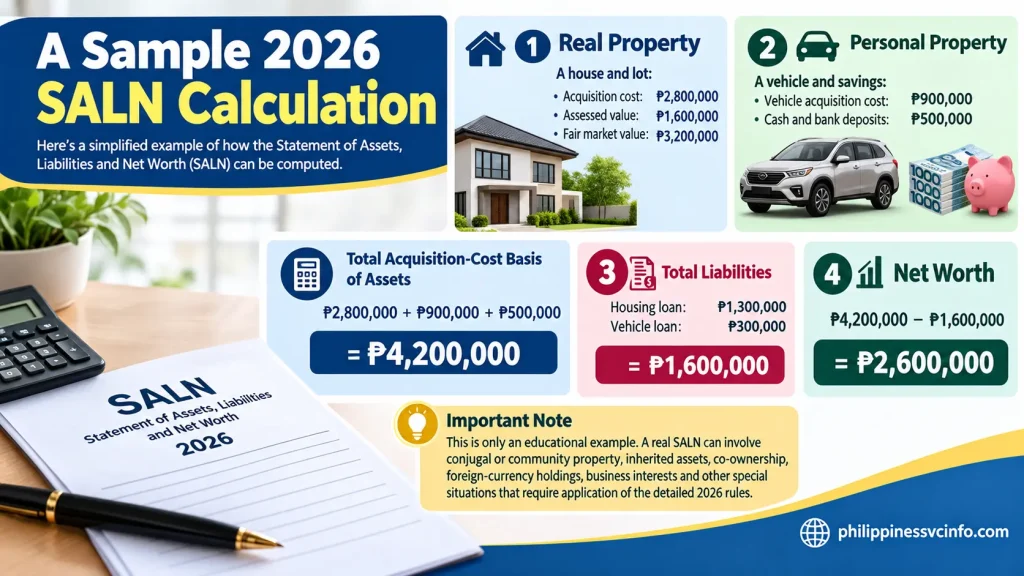
Suppose a hypothetical government employee has the following assets as of the applicable SALN date:
Real property
A house and lot:
- Acquisition cost: ₱2,800,000
- Assessed value: ₱1,600,000
- Fair market value: ₱3,200,000
Personal property
A vehicle and savings:
- Vehicle acquisition cost: ₱900,000
- Cash and bank deposits: ₱500,000
The total acquisition-cost basis of the assets in this simplified example would be:
₱2,800,000 + ₱900,000 + ₱500,000 = ₱4,200,000
Suppose the declarant still owes:
- Housing loan: ₱1,300,000
- Vehicle loan: ₱300,000
Total liabilities:
₱1,600,000
The simplified net-worth calculation is therefore:
₱4,200,000 − ₱1,600,000 = ₱2,600,000
This is only an educational example. A real SALN can involve conjugal or community property, inherited assets, co-ownership, foreign-currency holdings, business interests and other special situations that require application of the detailed 2026 rules.
Common SALN Mistakes to Avoid
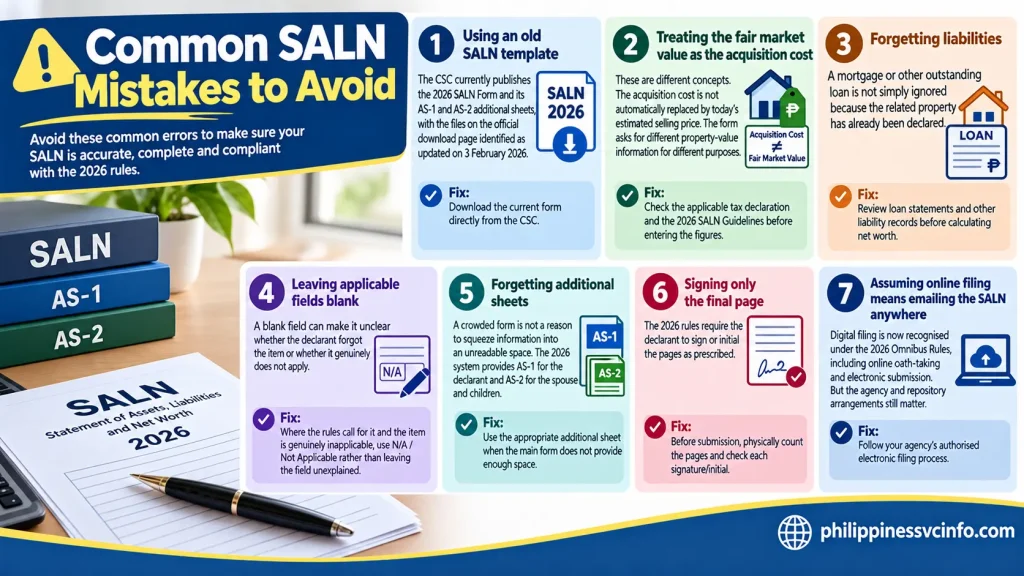
1. Using an old SALN template
This is one of the easiest mistakes to prevent.
The CSC currently publishes the 2026 SALN Form and its AS-1 and AS-2 additional sheets, with the files on the official download page identified as updated on 3 February 2026.
Fix: Download the current form directly from the CSC.
2. Treating the fair market value as the acquisition cost
These are different concepts.
The acquisition cost is not automatically replaced by today’s estimated selling price. The form asks for different property-value information for different purposes.
Fix: Check the applicable tax declaration and the 2026 SALN Guidelines before entering the figures.
3. Forgetting liabilities
A mortgage or other outstanding loan is not simply ignored because the related property has already been declared.
Fix: Review loan statements and other liability records before calculating net worth.
4. Leaving applicable fields blank
A blank field can make it unclear whether the declarant forgot the item or whether it genuinely does not apply.
Fix: Where the rules call for it and the item is genuinely inapplicable, use N/A / Not Applicable rather than leaving the field unexplained.
5. Forgetting additional sheets
A crowded form is not a reason to squeeze information into an unreadable space.
The 2026 system provides AS-1 for the declarant and AS-2 for the spouse and children.
Fix: Use the appropriate additional sheet when the main form does not provide enough space.
6. Signing only the final page
The 2026 rules require the declarant to sign or initial the pages as prescribed.
Fix: Before submission, physically count the pages and check each signature/initial.
7. Assuming online filing means emailing the SALN anywhere
Digital filing is now recognised under the 2026 Omnibus Rules, including online oath-taking and electronic submission. But the agency and repository arrangements still matter.
Fix: Follow your agency’s authorised electronic filing process. Don’t invent your own submission channel.
2026 SALN Filing: A Simple Workflow
If you’re preparing your SALN from scratch, this sequence can make the process easier:
Before opening the form
Gather:
- Previous SALN;
- Current property tax declarations;
- Purchase documents;
- Loan or liability statements;
- Bank and investment information;
- Vehicle or other registered-property records;
- Business-interest information;
- Relevant family information.
Then work through the form
1. Identify the filing type.
Annual, assumption of office or exit from service.
2. Complete personal information.
Check your name, position, office and address.
3. Review family disclosures.
Enter the required spouse and child information.
4. List real property.
Verify location, classification, acquisition details and values.
5. List personal property.
Review vehicles, cash, investments and other applicable assets.
6. Declare liabilities.
Check every outstanding loan or other liability.
7. Calculate net worth.
Confirm the arithmetic.
8. Review business interests and financial connections.
9. Review relatives in government.
10. Use AS-1 or AS-2 where required.
11. Check every page.
Confirm pagination, signatures/initials and completeness.
12. Take the oath and submit through your agency’s prescribed process.
This workflow separates information gathering from data entry. That can reduce last-minute omissions.
Frequently Asked Questions About the 2026 SALN Form
Final SALN 2026 Checklist
Before you hand over your SALN Form 2026 , take a final pause and check the declaration from the perspective of someone reviewing it for completeness.
Form
- Correct 2026 form downloaded from the CSC
- Correct filing type selected
- Correct annex used where necessary
People
- Declarant information checked
- Spouse information checked
- Eligible children identified
- Government relatives considered
Assets
- Real property reviewed
- Personal property reviewed
- Cash and investments checked
- Co-owned, inherited and donated property considered
- Foreign-currency assets converted where applicable
Liabilities
- Loans checked
- Outstanding balances verified
- Creditors and nature of liabilities entered correctly
Other disclosures
- Business interests reviewed
- Financial connections reviewed
- Net worth recalculated
Submission
- All pages signed/initialled as required
- Oath properly administered
- Required copies prepared
- HRMO or equivalent office submission completed
- Electronic procedure followed if filing digitally
- Personal copy retained
Conclusion
Filing the 2026 SALN Form in the Philippines is an important responsibility for covered government officials and employees. Completing the form correctly means providing accurate information about your assets, liabilities, business interests, financial connections, and other required details. Taking time to review each section can help prevent missing information, incorrect entries, and unnecessary corrections.Before submitting your SALN, check that the required fields are complete, figures are accurate, signatures and oath requirements are properly satisfied, and the correct filing procedure is followed through your agency’s HRMO or designated office. Keep a copy of your submitted SALN and supporting records for your reference.For the latest forms, guidelines, and official filing information, always refer to the Civil Service Commission (CSC) and your agency’s instructions. Staying updated with the current SALN rules can make the filing process clearer, more organised, and easier to complete on time.
Discover What You Need to Know:
- SSS Registration Philippines 2026: How to Get an SS Number & Create My.SSS
- DepEd Logo PNG: Official Download, Transparent File & Usage Guide 2026
- NBI Clearance Online Appointment Philippines 2026: How to Book, Pay & Schedule
- eFPS Login Philippines 2026: BIR eFPS Login Guide, Filing & Payment
- MMDA NCAP Guide Philippines 2026 : Check Violations, Fines & May Huli Ka







