Globe Recharge ML: Complete Guide to Mobile Legends Top-Up in the Philippines 2026

If you play Mobile Legends: Bang Bang (MLBB) in the Philippines, Globe can be used as a payment option for supported in-game purchases and gaming top-ups. Depending on your device and the payment platform available to you, you may be able to use regular Globe prepaid load, Globe postpaid billing, or a supported web-based payment service.
The phrase Globe Recharge ML generally refers to adding paid Mobile Legends content, such as Diamonds or eligible passes, using Globe-related payment methods.
For Android users, Google Play carrier billing can provide a direct way to pay from a supported Globe account. Players who prefer browser-based transactions, including many iPhone users, can use recognised gaming top-up platforms where Globe/TM payment is offered.
This guide explains the available approaches, what information you need, how the process works, and what to check if a recharge does not arrive as expected.
What Does Globe Recharge ML Mean?
Globe Recharge ML means using a Globe-supported payment method to purchase Mobile Legends: Bang Bang in-game currency or eligible game products.
A recharge does not mean adding Diamonds directly to your Globe SIM. Instead, your Globe account is used as the payment source for an MLBB purchase.
Depending on the method available, the transaction may involve:
- Globe prepaid regular load
- Globe postpaid billing
- Globe/TM mobile payment options on supported top-up platforms
- Google Play carrier billing on compatible Android devices
- Other payment services offered by authorised gaming platforms
The exact payment options can change depending on the platform, account, device, region and current service availability.
Quick Answer: If you want to use Globe for an MLBB recharge, first check whether your chosen payment route currently offers Globe/TM billing. Android users may see Globe carrier billing through Google Play, while web-based platforms can provide additional payment choices.
What Can You Buy With an ML Recharge?
A Globe Recharge ML transaction can be used for supported Mobile Legends purchases rather than ordinary mobile load.
Common examples include:
| MLBB Purchase | Purpose |
|---|---|
| Diamonds | In-game currency used for eligible Mobile Legends purchases |
| Weekly Diamond Pass | A supported recurring/reward-style MLBB purchase |
| Twilight Pass | Another eligible in-game purchase option when available |
The products, prices and payment options shown at checkout should always be treated as the current source of information. Avoid relying on old screenshots because game stores and payment interfaces can change.
What You Need Before Starting a Globe Recharge ML
A little preparation can prevent most failed transactions.
1. A Working Globe or TM Number
For a carrier-based payment, you need a supported Globe/TM mobile connection and an account that is eligible for the payment method.
If you’re a foreign resident, international student or tourist in the Philippines, make sure your Globe/TM service is active and that the particular payment option is available to your account.
2. Enough Regular Load
For prepaid users, make sure your account has enough regular consumable load for the transaction.
Having exactly the displayed purchase amount may not always be enough if applicable taxes or other charges are included during checkout. Keeping some additional balance can reduce the chance of an insufficient-funds error.
3. Your MLBB Account Details
For an external top-up website, you may need your:
- User ID
- Zone ID
These identify the Mobile Legends account receiving the purchase.
You can normally find these details through your MLBB profile.
4. A Supported Payment Platform
For web-based purchases, use a recognised platform and confirm that Globe/TM is actually displayed as a payment option before proceeding.
For example, you can check the Mobile Legends section on Codashop Philippines.
Method 1: Globe Recharge ML Through Google Play
Android users may be able to pay for supported Mobile Legends purchases through Google Play carrier billing.
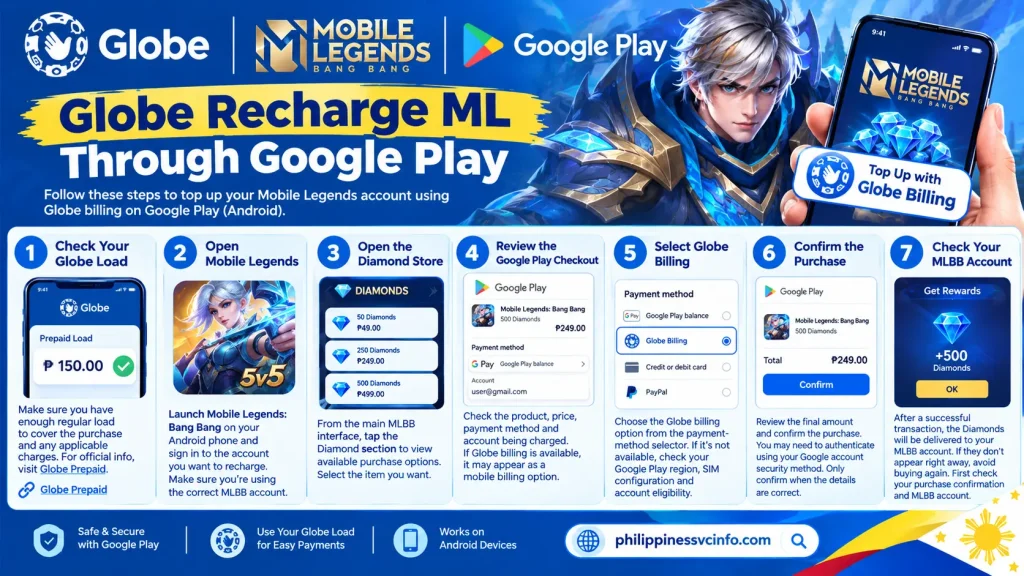
This approach is useful because the transaction takes place through the game’s normal purchase flow rather than requiring you to manually enter your MLBB account details on an external recharge website.
Step 1: Check Your Globe Load
Before opening Mobile Legends, check your Globe prepaid balance.
Make sure you have enough regular load to cover the intended purchase and any applicable charges shown during checkout. A small balance buffer is sensible if you’re using prepaid load.
For official Globe information about prepaid services and loading options, use Globe Prepaid.
Step 2: Open Mobile Legends
Launch Mobile Legends: Bang Bang on your Android phone and sign in to the account you want to recharge.
Before buying anything, check that you’re using the correct MLBB account. This is particularly important if you have more than one account on your device.
Step 3: Open the Diamond Store
From the main MLBB interface, look for the Diamond section near the top of the screen.
Tap it to view the available purchase options.
You may see different Diamond packages and other eligible products. Select the item that you actually want rather than assuming that every option has the same value or benefits.
Step 4: Review the Google Play Checkout
After selecting your purchase, Google Play should display the relevant payment screen.
Check the:
- Product
- Price
- Payment method
- Account being charged
If Globe carrier billing is available for your account, it may appear as a mobile billing option.
Step 5: Select Globe Billing
If supported, open the payment-method selector and choose the Globe billing option.
The wording shown by Google Play can vary depending on the current interface, account configuration and device.
If Globe billing does not appear, don’t repeatedly attempt the transaction. Check your Google Play country/region, SIM configuration and account eligibility first.
Step 6: Confirm the Purchase
Review the final amount carefully before confirming.
Google Play may ask you to authenticate the transaction using your Google account security method. Follow the on-screen instructions and only confirm when the displayed details are correct.
Step 7: Check Your MLBB Account
After a successful transaction, the purchased content should be delivered to the Mobile Legends account associated with the purchase.
If the Diamonds do not appear immediately, avoid buying the same package again straight away. First check your purchase confirmation and MLBB account.
When Globe Carrier Billing Is Useful
For an Android player who already has sufficient Globe load, carrier billing can reduce the number of separate payment steps.
It can be particularly convenient when you don’t want to enter card information for a small gaming purchase.
However, availability is not universal. Payment methods depend on the services supported by Google Play, Globe and your account configuration.
Globe Recharge ML Through a Web Top-Up Platform
A second route is to use a recognised online gaming-credit platform that supports Mobile Legends and offers Globe/TM as a payment option.
This can be useful when:
- You’re using an iPhone or another device without Google Play carrier billing.
- Globe billing is unavailable through your Google Play account.
- You prefer browser-based top-ups.
- You want to use a dedicated game top-up interface.
The key difference is that you normally identify the MLBB account you want to recharge first, then select the product and payment method.
What to Have Ready
Before opening a web top-up service, prepare:
- Your Mobile Legends account
- User ID
- Zone ID
- Active Globe/TM number
- Email address if the platform requests one
- Sufficient payment balance
Do not prepare your Moonton password or account login credentials. A legitimate top-up process should not require you to hand over your game password simply to deliver Diamonds.
How to Recharge Mobile Legends With Globe/TM Online
A browser-based Globe Recharge ML option can be useful when you don’t want to use Google Play carrier billing. The exact payment methods shown by a top-up provider can vary, so check the checkout page before entering payment details.
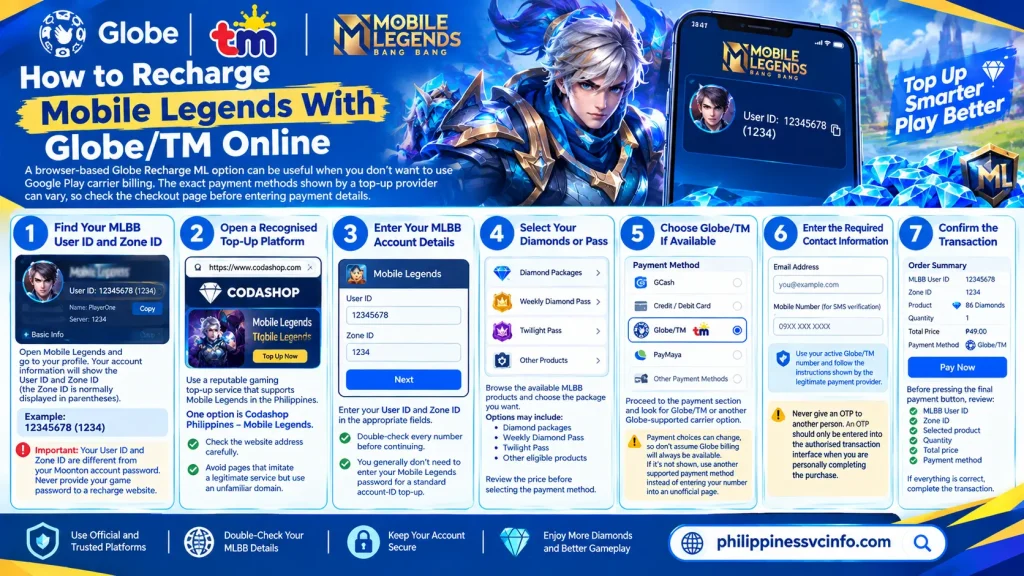
Step 1: Find Your MLBB User ID and Zone ID
Open Mobile Legends and go to your profile.
Your account information should show the User ID and Zone ID. The Zone ID is normally displayed alongside the User ID in parentheses.
For example, it may appear in a format similar to:
12345678 (1234)
These numbers are important because they tell the top-up service which MLBB account should receive the purchase.
Important: Your User ID and Zone ID are different from your Moonton account password. Never provide your game password to a recharge website.
Step 2: Open a Recognised Top-Up Platform
Use a reputable gaming top-up service that supports Mobile Legends in the Philippines.
One option is Codashop Philippines – Mobile Legends.
Before proceeding, check the website address carefully. Avoid pages that imitate the appearance of a legitimate recharge service but use an unfamiliar domain.
Step 3: Enter Your MLBB Account Details
Enter your User ID and Zone ID in the appropriate fields.
Double-check every number before continuing. A typing mistake can potentially send a purchase to the wrong account.
You generally don’t need to enter your Mobile Legends password for a standard account-ID top-up.
Step 4: Select Your Diamonds or Pass
Browse the available MLBB products and choose the package you want.
Depending on what the platform currently supports, options may include:
- Diamond packages
- Weekly Diamond Pass
- Twilight Pass
- Other eligible Mobile Legends products
Review the price before selecting the payment method.
Step 5: Choose Globe/TM If Available
Proceed to the payment section and look for Globe/TM or another Globe-supported carrier payment option.
Payment choices can change, so don’t assume Globe billing will always be available. If the option isn’t displayed, use another supported payment method instead of entering your number into an unofficial payment page.
Step 6: Enter the Required Contact Information
The platform may request an email address for transaction or receipt purposes.
If an SMS verification step is presented, use the active Globe/TM number associated with the transaction and follow the instructions shown by the legitimate payment provider.
Never give an OTP to another person. An OTP should only be entered into the authorised transaction interface when you are personally completing the purchase.
Step 7: Confirm the Transaction
Before pressing the final payment button, review:
- MLBB User ID
- Zone ID
- Selected product
- Quantity
- Total price
- Payment method
If everything is correct, complete the transaction.
Keep the confirmation page, SMS notification or email receipt until the Diamonds or other purchased content has been successfully delivered.
Globe Recharge ML: Google Play vs Web Top-Up
The two approaches serve slightly different situations.
| Feature | Google Play Carrier Billing | Web Top-Up |
|---|---|---|
| Main device | Android | Android, iPhone and other supported devices |
| Payment source | Supported Globe billing | Payment methods offered by provider |
| MLBB ID required | Usually handled through the game purchase | Usually User ID + Zone ID |
| Browser required | No | Yes |
| Globe availability | Depends on Google Play/account eligibility | Depends on provider |
| Receipt | Google Play transaction record | Provider receipt/email/SMS |
Neither method should be assumed to work for every Globe customer. Availability depends on the current service configuration and the payment provider.
What If Globe Billing Does Not Appear?
One of the most common problems with a Globe Recharge ML attempt is that the Globe billing option isn’t displayed.
There are several things worth checking before trying another purchase.
Check Your Google Play Region
If you’re using Google Play carrier billing, your Google Play account needs to be configured for the appropriate region.
A mismatch between your account region and current location can affect which payment methods are displayed.
Check Your SIM Configuration
On a dual-SIM Android phone, make sure the relevant Globe SIM is properly installed and recognised by the device.
You can also restart the phone and check whether the mobile connection is working normally.
Check Your Globe Balance
For prepaid transactions, confirm that you have enough regular load.
Don’t assume that promotional data allocations or other non-cashable benefits can automatically be used to pay for an MLBB purchase. The payment method determines what balance is eligible.
What to Do When a Globe Recharge ML Payment Is Declined
A declined transaction doesn’t necessarily mean your MLBB account has a problem.
Start by checking the payment side of the transaction.
Insufficient Balance
If the available regular load isn’t enough for the final amount, the payment can fail.
Add sufficient regular load and try again only after confirming that the previous transaction wasn’t already completed.
Payment Method Unavailable
The Globe option may temporarily be unavailable or may not be supported for your particular account.
In that situation, check another supported payment method instead of repeatedly submitting failed transactions.
Carrier Billing Restrictions
Carrier billing can have transaction or spending limits.
If you have reached an applicable limit, waiting for the relevant billing period or using another supported payment method may be necessary.
What If You Paid but the Diamonds Are Missing?
This situation can be stressful, especially when the payment has already been deducted.
First, don’t immediately purchase the same package again.
Instead, work through these checks:
- Confirm that the payment was actually successful.
- Check your Google Play or top-up provider receipt.
- Verify that the User ID and Zone ID were correct if you used a web service.
- Close and reopen Mobile Legends.
- Check your in-game messages or relevant account notifications.
- Keep your transaction reference and receipt if customer support is needed.
A delayed game-server synchronisation can sometimes make a successful purchase appear later than expected.
Common Globe Recharge ML Problems
| Problem | What to Check |
|---|---|
| Payment declined | Regular Globe balance and payment eligibility |
| Globe billing missing | Google Play region, SIM and account configuration |
| Diamonds missing | Receipt, User ID, Zone ID and game synchronisation |
| Recharge sent to wrong account | Details entered before payment |
| Carrier payment unavailable | Current service availability and account limits |
| Suspicious recharge page | Website domain and payment provider |
The most important habit is to verify the transaction before repeating it. Multiple attempts can create confusion if an earlier payment is still processing.
Protect Yourself From Fake ML Recharge Offers
Gaming-related searches can attract websites promising unusually cheap Diamonds, free currency or unlimited recharge codes.
Treat these offers carefully.
A legitimate recharge does not require you to surrender your Mobile Legends password simply to deliver Diamonds.
Avoid Unofficial Diamond Generators
Websites claiming that you can generate unlimited free Diamonds by entering your account details should be treated as suspicious.
Don’t install unknown apps or browser extensions simply because a page claims they are required for a “free recharge”.
Never Share Your OTP
Your OTP is a security credential.
If a person contacts you through social media and asks for your Globe OTP to “verify” a discounted ML recharge, don’t provide it.
The same applies to passwords and other account-security information.
Keep Your Receipts
Save your:
- Globe transaction SMS
- Google Play receipt
- Top-up platform receipt
- Transaction/reference number
These records can be useful if you need to investigate a missing purchase.
A Safer Globe Recharge ML Checklist
Before paying, run through this short checklist:
- ✓ I’m using the correct Mobile Legends account.
- ✓ My User ID and Zone ID are correct.
- ✓ I have sufficient eligible Globe balance.
- ✓ The payment page belongs to a recognised provider.
- ✓ The displayed product and amount are correct.
- ✓ I haven’t shared my password or OTP with anyone.
- ✓ I’ll keep the transaction receipt.
This takes only a minute but can prevent many avoidable recharge problems.
How to Check a Globe Recharge ML Transaction
After completing a Globe Recharge ML purchase, keep the transaction record until the Diamonds or selected MLBB item appears in your account.
If you used Google Play, check the purchase record associated with your Google account. For a web-based recharge, check the confirmation page or email supplied by the top-up provider.
If money or load was deducted but the game item is missing, don’t immediately submit another order. First confirm whether the original transaction was successful or still processing.
What Information Should You Keep?
For any important gaming purchase, save enough information to identify the transaction later.
Keep:
- Transaction or reference number
- Purchase date and time
- Amount paid
- Selected MLBB product
- Google Play receipt, if applicable
- Top-up platform receipt, if applicable
- Relevant Globe SMS confirmation
Avoid sharing these records publicly if they contain personal or transaction information.
Globe Recharge ML Safety Tips
A safe recharge is about more than choosing a payment button. You also need to protect the accounts and information connected to the transaction.
Use the Official Globe Website for Globe Services
For Globe-related account, prepaid and service information, start with the official Globe website:
Globe Philippines Official Website
When searching for a Globe service through Google or another search engine, check the domain before entering your mobile number or other information.
Use Recognised Gaming Platforms
If you choose a web-based Globe Recharge ML method, use an established gaming top-up provider and verify that the Mobile Legends page is genuine.
For example, you can access the Mobile Legends section on:
Codashop Philippines – Mobile Legends
Don’t assume that every website displaying Globe or Mobile Legends logos is an authorised service.
Never Give Away Your Password
Your Mobile Legends or Moonton password isn’t something a normal account-ID top-up should require.
Be especially cautious if someone promises:
- Free Diamonds
- Extremely cheap Diamonds
- Unlimited Diamonds
- Secret recharge codes
- Special “admin” top-ups
If the offer requires your password, OTP or other security credentials, stop before proceeding.
Globe Recharge ML for Foreign Residents and Students
Foreign residents and international students in the Philippines may use Globe or TM services, but the availability of a particular payment method can depend on the mobile account, device, payment provider and account configuration.
The same basic process applies:
- Make sure your Globe/TM service is active.
- Check whether the intended payment method is available.
- Have sufficient eligible balance if using prepaid load.
- Confirm your MLBB User ID and Zone ID when using a web top-up.
- Review the final price before authorising payment.
- Save the transaction confirmation.
Tourists and temporary visitors should also check the terms and limitations of their particular SIM or mobile service before relying on carrier billing.
Common Mistakes to Avoid
A few small mistakes can turn a straightforward Globe Recharge ML transaction into a support issue.
Entering the Wrong User ID
The User ID identifies the MLBB account receiving the purchase. Always compare the details carefully before confirming.
Confusing Regular Load With Promotional Benefits
Having a large amount of promotional data or another Globe bundle doesn’t necessarily mean you have enough eligible balance for a paid game transaction.
Check the type of balance available rather than looking only at the headline amount.
Repeating a Failed Transaction Too Quickly
If the first transaction appears unsuccessful, check your purchase history and account balance before trying again.
A payment that is still processing can create confusion if you immediately submit another order.
Using Old Instructions
Google Play, Globe services and gaming platforms can change their interfaces and payment options.
If a button or menu described in an old guide isn’t visible, follow the current options displayed by the official service rather than trying to reproduce an outdated process.
Frequently Asked Questions About Globe Recharge ML
Final Globe Recharge ML Checklist
Before completing your next recharge, remember these six points:
1. Check the payment method.
Make sure Globe/TM billing is actually available.
2. Check your balance.
For prepaid transactions, maintain enough eligible regular load.
3. Verify your MLBB details.
Double-check the User ID and Zone ID for external top-ups.
4. Review the checkout page.
Confirm the product and final amount before paying.
5. Protect your account.
Never disclose your password or OTP to a recharge seller.
6. Save your receipt.
Keep transaction evidence until the purchased Diamonds or pass has arrived.
Final Thoughts
Globe Recharge ML gives eligible Globe users several possible ways to pay for Mobile Legends purchases. Android players may find carrier billing through Google Play convenient, while web-based top-up services can provide another route when supported.
The most important part isn’t simply completing the payment. It is making sure you’re using the correct account, a legitimate payment channel and the right MLBB account details. Check the final price, keep your transaction records and never trade account security for an attractive-looking discount.